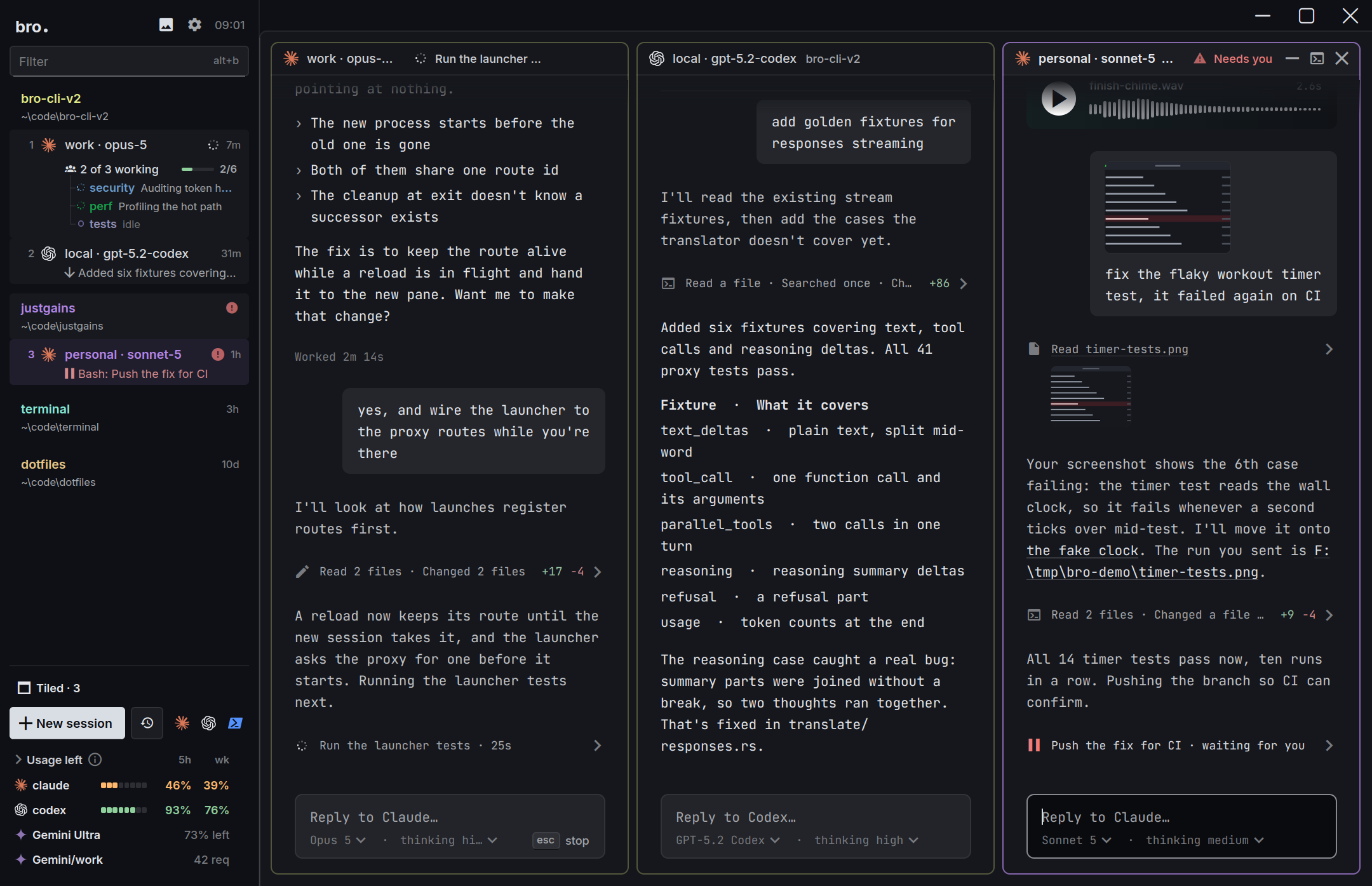
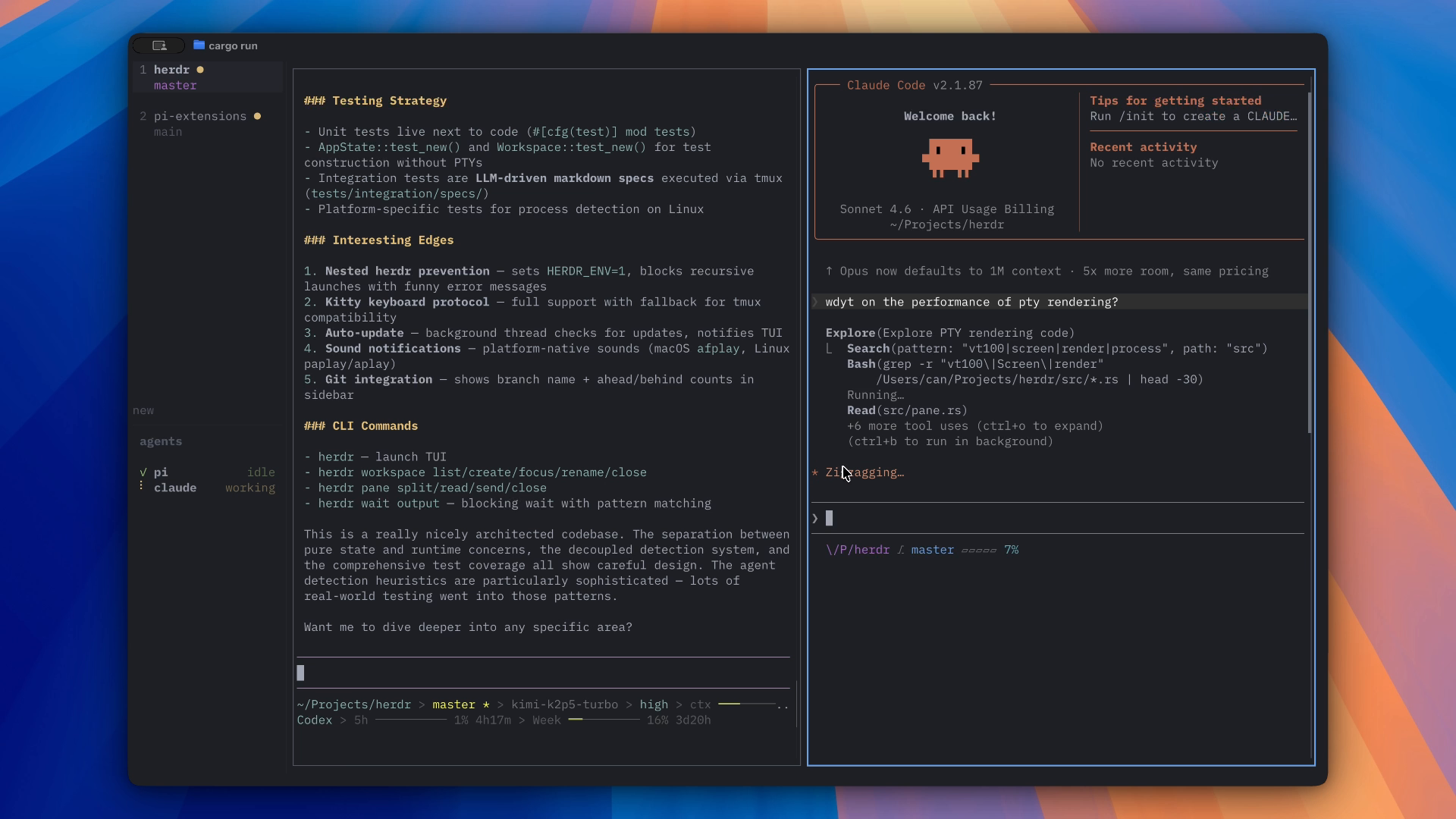
Four ways to run a fleet of coding agents, checked row by row: what each one does best, how it handles many projects, who actually handles your logins, and a plain answer on which to pick.
By the Bro.Tech team13 min read
Checked against Herdr 0.1.9 and 0.9.5, T3 Code 0.1.5, Orca 1.4.245 and Bro 2.1.20. We make Bro, so we show our sources and where the others win.
There's no single best one, because each is built around a different center: Orca around git, T3 Code around one clean window for every agent, Herdr around the terminal itself, and Bro around the agents' models, logins and crew.
So match the line that sounds like your week. We make Bro, which is why we've shown the others' strengths as carefully as our own.
Claude Code on a GPT, Gemini or Kimi model, or a local one Bro
Many projects at once, with an orchestrator for each Bro
The same sessions in a desktop app and a terminal UI Bro
Logins signed in for me, with a hand-off when one runs out Bro
A reviewer that keeps agents working through the night Bro
A worktree for every task, with PR checks and tickets beside it Orcaor T3 Code
A browser and a code editor in the same window Orca
One identical chat view for every agent T3 Code
A phone app on both stores today T3 Code
The lightest tool that herds any terminal agent Herdr
Agents that spawn each other through an open API, and a UI my agent rewrites Herdr
The most agents supported out of the box Orcaor Herdr
Four tools, four centers.
All four run your own agent subscriptions, all four are free and open source, and all four keep an eye on which agent needs you. What they put in the middle is what separates them. Each card links to the full head-to-head.
The bicep is Bro. The ram is Herdr's, the cloche is T3 Code's own "restaurant" metaphor, and the orca is Orca. Made with JustImagine.
Bro
Built around the agents.
Any model in any agent, through a translating proxy
Managed logins, limits on screen, hand-off at the limit
Many projects: an orchestrator for each and one above them all
A desktop app and a terminal UI on the very same sessions
39 things people choose on. A filled dot is a yes, a half dot is partly, a dashed one is a no. On a phone, each row becomes a small card. Flip the switch to hide every row where all four answer the same.
10rows where Bro is the only one at the top
1rows where Herdr is the only one at the top
2rows where T3 Code is the only one at the top
1rows where Orca is the only one at the top
25rows where two or more share the top spot
39 rows people actually choose on. Checked October 30, 2026.
Yes
Partly
No
Feature by feature: Bro, Herdr, T3 Code, Orca
Feature
BroDesktop, terminal and phone
HerdrNative app and terminal multiplexer
T3 CodeDesktop app for coding agents
OrcaWorktree-first agent IDE
Where it runs
Desktop app
BroWindows, macOS and Linux, drawn natively on the GPU
HerdrNew native GPU app: Windows, Linux, Apple silicon Macs
T3 CodeElectron: Windows, macOS and Linux
OrcaElectron: Windows, macOS and Linux
Small downloadThe Windows download
Bro19 MB
Herdr24 MB
T3 Code290 MB
Orca197 MB
Terminal UI on the same sessions as the desktop appFor SSH and servers with no display
Brobro-cli: the same sessions, sidebar, launcher and keys
HerdrA TUI exists, but it's a separate program from the app
T3 CodeBrowser or phone over T3 Connect
OrcaA headless server and a web client
Phone app
BroiPhone and Android, not on the stores yet
HerdrNone. Use an SSH client with the TUI
T3 CodeOn the App Store and Google Play, with push
OrcaOn the App Store in beta. Android is an APK
Drive agents on another machine
BroTerminal UI over SSH, phone over your network or Tailscale
HerdrSSH machines in one sidebar
T3 CodeT3 Connect, SSH, Tailscale, LAN pairing
OrcaSSH worktrees, remote servers in beta, Tailscale
Many projects at once
Every project and its agents in one sidebar
BroGrouped by project by default, with live counts and who needs you
HerdrSpaces, each with its agents, in one sidebar
T3 CodeOne thread list across projects. Grouping by project is a beta setting
OrcaWorktrees grouped by project, with filters and project groups
Jump to whoever needs you, whichever project
BroAlt+A jumps to the session that needs you
HerdrPriority sort puts waiting agents first
T3 CodeThreads that need you return to the top
OrcaA bell, bold unread worktrees and a Cmd-J jump palette
A coordinator for each project, and one over all of them
BroA project orchestrator each, and a root one above them
HerdrNot in its docs
T3 CodeAn outside agent can start threads in every project
OrcaExperimental orchestration spans worktrees
Agents kept out of other projects' sessionsClaude Code lets any session message any other
BroClaude sessions only reach their own project by default
HerdrNot in its docs
T3 CodeNot in its docs
OrcaNot in its docs
Several windows on the same sessions
Brobro --view opens another window on the running sessions
HerdrThe TUI serves several clients at once
T3 CodeDesktop, web and phone clients on one server
OrcaOne window. Browser and phone clients connect to it
Agents and models
Agents with first-class support
BroClaude Code, Codex, Pi, omp. Anything else runs in a shell tab
Herdr20+ named, and any program runs in a terminal
T3 CodeClaude, Codex, Cursor, Grok Build, OpenCode, Antigravity, Pi and more
Orca40 documented, including Claude Code, Codex, Pi and omp
The agent's own terminal, untouchedNot a window rebuilt around its SDK
BroReal terminals, kitty keyboard protocol
HerdrReal terminals, run as they are
T3 CodeIts own chat UI over each agent's SDK or protocol
OrcaReal terminals by default
A clean chat view of the session
BroFocus mode in the desktop app
HerdrTerminals only
T3 CodeIts main view, on desktop, web and phone
OrcaAn experimental Chat UI for Claude, Codex, Pi, omp and more
Any model in any agentClaude Code on GPT, Codex on Claude
BroTranslating proxy, 16 providers
HerdrNo model layer. The agent's own command picks the model
T3 CodeYour own keys and endpoint per provider instance
OrcaNo proxy. Point an agent at another provider by hand
Local models
BroOllama and LM Studio
HerdrWhatever your agent supports. No model layer
T3 CodeIts FAQ says no
OrcaWhatever your agent supports. No model layer
Logins and limits
Managed loginThe app runs the sign-in and keeps it fresh
BroSign in once, Bro keeps every login ready
HerdrEach agent logs in on its own, in its terminal
T3 CodeIn-app sign-in for ChatGPT, Cursor and Antigravity. The rest need their CLI
OrcaManaged accounts and one-click swap. Sign-in still runs through the agent
Several logins per agent
BroProfiles side by side
HerdrOnly by hand, with your own launch commands
T3 CodeA provider instance per account
OrcaClaude, Codex and more, swapped in one click
Live 5-hour and weekly limits
BroMeters in the sidebar and a Usage view
HerdrNone built in
T3 CodeA Limits view with reset times
OrcaStatus-bar usage for Claude, Codex, Gemini, Cursor and more
Hands off to the next login at a limit
BroProxy mode, before the agent sees an error
HerdrNone
T3 CodeNew threads skip a provider that just hit a limit. No pooling
OrcaNo failover yet. It's an open request
Orchestration
An agent that opens and runs other agents
BroThe orchestrator opens sessions and hands out tasks
HerdrAgents start, prompt and wait on each other through its CLI
T3 CodeDelegated child threads, and an MCP for outside agents
OrcaThe orca CLI, plus experimental workers and tasks
Scheduled prompts
Broin 10m, at 17:30, daily 09:00
HerdrNot in its docs
T3 CodeInterval, time and webhook triggers
OrcaAutomations: hourly, daily, weekly, cron
A reviewer that keeps an agent working while you're awayReads the chat, checks milestones, sends the next task
BroWatchdogs
HerdrNot in its docs
T3 Code/goal keeps Codex and Claude going until a goal is met
OrcaExperimental orchestration supervises workers on a task graph
One prompt to several agents at once
BroAsk the orchestrator to open several sessions on one task
HerdrScripted on its CLI
T3 CodePick several models, each gets a thread and worktree
OrcaBy hand: the same prompt in several worktrees
Control it from a script or MCP
Brobro ctl and 26 MCP tools
HerdrCLI, socket API and a skill. No MCP server
T3 CodeAn MCP server and the t3 CLI
OrcaThe orca CLI and skills. No MCP server found
Voice
BroPush-to-talk to the orchestrator, dictation on the phone
HerdrNone
T3 CodeDictation on iPhone only
OrcaOn-device dictation, hold to talk, on desktop and phone
Sessions and attention
Sessions survive closing the app
BroA session server keeps them running, even through a crash or update
HerdrClose it, update it, crash it: they keep running
T3 CodeBackground service on Linux and macOS, not on Windows
OrcaA background daemon keeps agents alive
Agents pick up their conversations after a reboot
BroClaude and Codex resume where they were
HerdrThe TUI does for supported agents. The app starts fresh shells
T3 CodeContinues threads after restarts
OrcaOne-click resume from session history
Told when an agent needs you
BroSidebar status, sounds and phone banners
HerdrSidebar status, sounds and toasts
T3 CodePush notifications and Live Activities
OrcaSystem notifications, sounds and phone push
Code, git and review
Git worktree per task
BroLeaves git to your agents and tools
HerdrWorktrees as spaces, in the app and the TUI
T3 CodeBranch and worktree controls in every thread
OrcaWorktree-native: every task gets one
Diffs, pull requests and review in the app
BroYour agents and git client do that
HerdrA Changes panel with diffs and commit. No pull requests
T3 CodeGitHub, GitLab, Bitbucket, Azure DevOps, Forgejo
OrcaDiffs, notes sent back to the agent, GitHub, GitLab, Linear, Jira
Editor and file tree
BroOpens files from links in a preview. No editor
HerdrA read-only Files panel
T3 CodeFile viewers. Edits go to your editor
OrcaMonaco editor and a file explorer
A browser next to the agent
BroPreviews HTML files and media beside the session
HerdrNone
T3 CodeShared browser tabs agents can drive
OrcaBuilt-in Chromium with a design mode
Make it yours
Themes
Bro57, with 19 bundled terminal fonts
HerdrA few built in, custom JSON themes
T3 CodeThemes, custom themes, light and dark
Orca30 terminal themes, Ghostty and Warp imports
Plugins, or a UI your agent can rewrite
BroThemes, Quips and skills, no plugin API
HerdrMods and layouts the agent edits, 1,900+ TUI plugins
T3 CodeFork it. No plugin API
OrcaPlugins, in alpha
Sound packs for finished and waiting
Bro376 packs
HerdrTwo bundled sounds, replaceable
T3 CodeTwo bundled sounds
OrcaYour own notification sounds
Manage skills for every agent in one place
BroA Skills view that installs across agents
HerdrDoesn't manage skills or MCP servers
T3 CodePicks up each agent's own skills in the composer
OrcaInstalls and shares skills, manages MCP servers
Cost and license
Open source
BroMIT
HerdrApache-2.0
T3 CodeMIT
OrcaMIT
Free to use
BroYou pay your model providers
HerdrYou pay your model providers
T3 CodeYou pay your model providers. T3 Connect covers 3 machines
OrcaYou pay your model providers
No product analytics
BroNone in its source
HerdrApp: on by default, off in Settings. TUI: none documented
T3 CodeOn by default, off with an environment variable
OrcaOn by default, off in Settings
The widest gap
Managed login: who signs you in?
Every serious agent setup ends up with several logins, and a meter you can't ignore. This is where the four differ most, so here's that slice on its own.
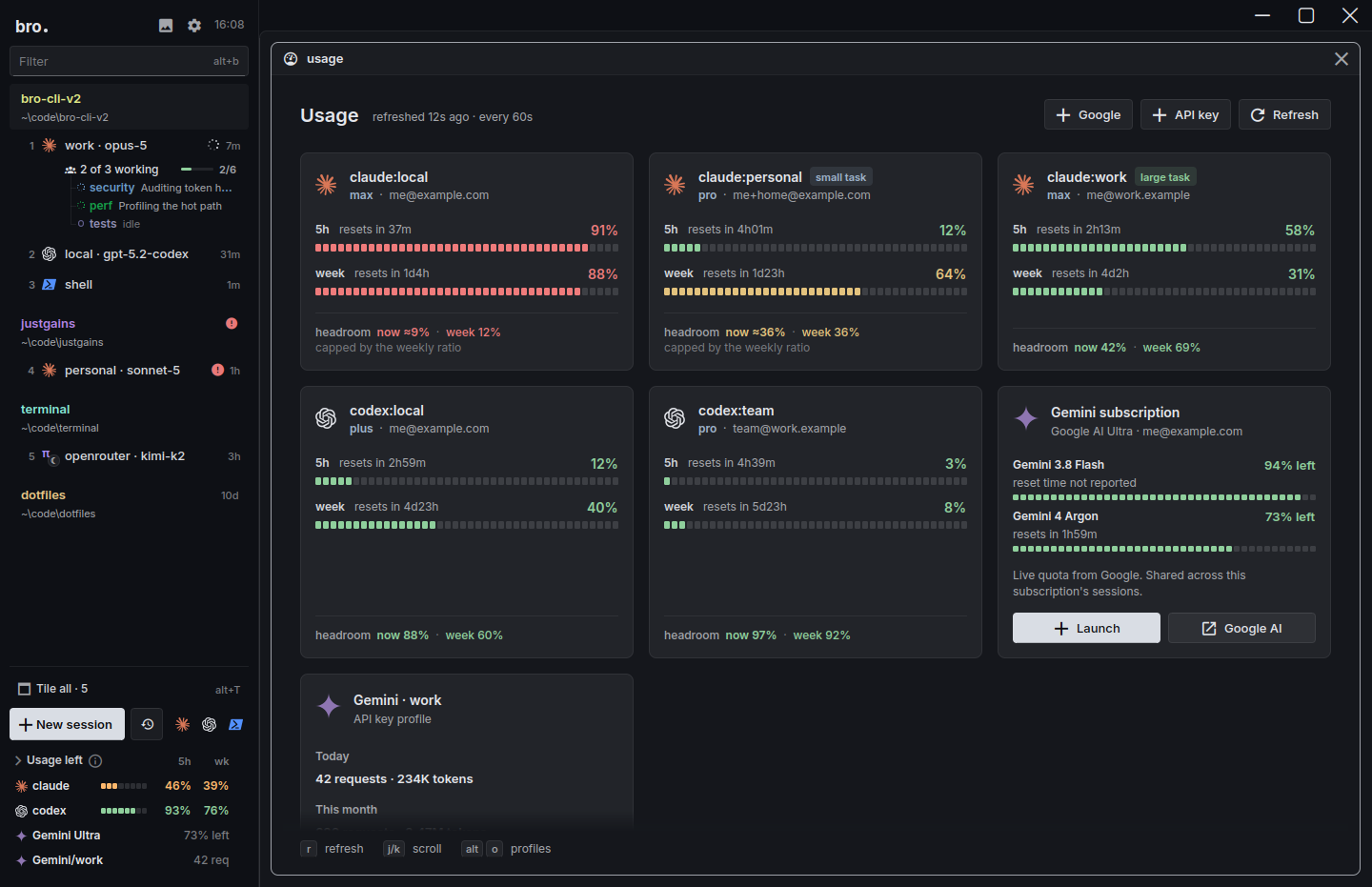
Bro manages them. Add a login from the launcher and Bro runs the sign-in, keeps it in a profile of its own and flags one that needs attention before a session finds out. Any session can run on any login, the sidebar shows what's left on each, and in proxy mode a login at its limit hands its work to the next before the agent sees an error.
Add a loginPick Claude, ChatGPT or Gemini in the launcher. No terminal tab, no typing /login.
Bro signs you inIt runs the sign-in, keeps the login in a profile of its own and flags one that needs attention before a session finds out.
Use it anywhereAny session can run on any login. Proxy mode spreads the work and hands off the moment one hits its limit.πω
Every login with what's left on it. Real screen, demo accounts.
4 rows people actually choose on. Checked October 30, 2026.
Yes
Partly
No
Feature by feature: Bro, Herdr, T3 Code, Orca
Feature
BroDesktop, terminal and phone
HerdrNative app and terminal multiplexer
T3 CodeDesktop app for coding agents
OrcaWorktree-first agent IDE
Logins and limits
Managed loginThe app runs the sign-in and keeps it fresh
BroSign in once, Bro keeps every login ready
HerdrEach agent logs in on its own, in its terminal
T3 CodeIn-app sign-in for ChatGPT, Cursor and Antigravity. The rest need their CLI
OrcaManaged accounts and one-click swap. Sign-in still runs through the agent
Several logins per agent
BroProfiles side by side
HerdrOnly by hand, with your own launch commands
T3 CodeA provider instance per account
OrcaClaude, Codex and more, swapped in one click
Live 5-hour and weekly limits
BroMeters in the sidebar and a Usage view
HerdrNone built in
T3 CodeA Limits view with reset times
OrcaStatus-bar usage for Claude, Codex, Gemini, Cursor and more
Hands off to the next login at a limit
BroProxy mode, before the agent sees an error
HerdrNone
T3 CodeNew threads skip a provider that just hit a limit. No pooling
OrcaNo failover yet. It's an open request
Orca comes closest: several accounts, one-click swaps and usage meters, though the sign-in still runs through each agent and there's no failover yet. T3 Code signs you in for ChatGPT, Cursor and Antigravity and keeps an instance per account, but says a bigger pool belongs outside the app. Herdr leaves login to each agent on purpose. Pooling is your call in any of them: use logins you own, and read each provider's terms first.
Real work is never one repo
Many projects at once.
All four can show a lot of projects. Orca's sidebar is the most developed, with worktrees grouped by project, filters, pins and a jump palette. Herdr gives you spaces with their agents ranked by who's waiting, and T3 Code lists threads from every project, with grouping by project still a beta setting.
Bro groups by project too. What it adds is coordination: an orchestrator for each project and one above them all, agents that by default can only message sessions in their own project, and the same view on your phone, in a terminal and in a window. Here's that slice of the chart on its own.
5 rows people actually choose on. Checked October 30, 2026.
Yes
Partly
No
Feature by feature: Bro, Herdr, T3 Code, Orca
Feature
BroDesktop, terminal and phone
HerdrNative app and terminal multiplexer
T3 CodeDesktop app for coding agents
OrcaWorktree-first agent IDE
Many projects at once
Every project and its agents in one sidebar
BroGrouped by project by default, with live counts and who needs you
HerdrSpaces, each with its agents, in one sidebar
T3 CodeOne thread list across projects. Grouping by project is a beta setting
OrcaWorktrees grouped by project, with filters and project groups
Jump to whoever needs you, whichever project
BroAlt+A jumps to the session that needs you
HerdrPriority sort puts waiting agents first
T3 CodeThreads that need you return to the top
OrcaA bell, bold unread worktrees and a Cmd-J jump palette
A coordinator for each project, and one over all of them
BroA project orchestrator each, and a root one above them
HerdrNot in its docs
T3 CodeAn outside agent can start threads in every project
OrcaExperimental orchestration spans worktrees
Agents kept out of other projects' sessionsClaude Code lets any session message any other
BroClaude sessions only reach their own project by default
HerdrNot in its docs
T3 CodeNot in its docs
OrcaNot in its docs
Several windows on the same sessions
Brobro --view opens another window on the running sessions
HerdrThe TUI serves several clients at once
T3 CodeDesktop, web and phone clients on one server
OrcaOne window. Browser and phone clients connect to it
One workspace, every use case
A terminal UI and a desktop app, for every use case.
Bro is the only one of the four where the terminal UI and the desktop app are one workspace. Herdr has both, as separate programs that don't share agents. T3 Code and Orca are windows, with a server mode and a browser or a phone to look at it, and no terminal UI.
With Bro you open the app at your desk, SSH into a server and get the terminal version without asking, add another window on the same sessions with bro --view, pair a phone, or drive it all from a shell with bro ctl. Only a few things need a window, such as focus mode and the media panel.
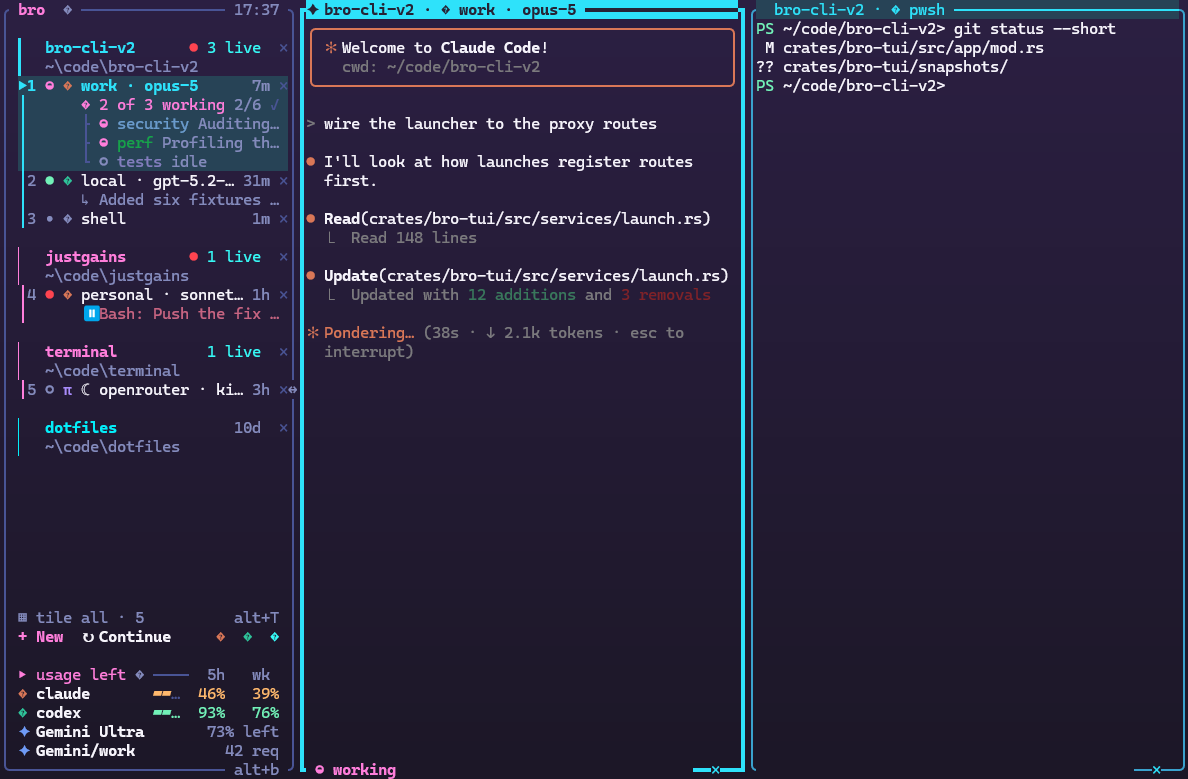
The terminal UI: the same sessions and sidebar, over SSH or with no display.
The desktop app: the same sessions, with the terminals drawn on the GPU.
Desktop appbroWindows, macOS and Linux, with the terminals drawn on the GPU.
Terminal UIbro-cliThe same workspace over SSH, in tmux or with no display.
Another windowbro --viewMore windows on the sessions that are already running.
PhonePair onceiPhone and Android, paired to your computer.
Scripts and voicebro ctlThe orchestrator's MCP tools from any shell, or hold Right Win and talk.
5 rows people actually choose on. Checked October 30, 2026.
Yes
Partly
No
Feature by feature: Bro, Herdr, T3 Code, Orca
Feature
BroDesktop, terminal and phone
HerdrNative app and terminal multiplexer
T3 CodeDesktop app for coding agents
OrcaWorktree-first agent IDE
Where it runs
Desktop app
BroWindows, macOS and Linux, drawn natively on the GPU
HerdrNew native GPU app: Windows, Linux, Apple silicon Macs
T3 CodeElectron: Windows, macOS and Linux
OrcaElectron: Windows, macOS and Linux
Small downloadThe Windows download
Bro19 MB
Herdr24 MB
T3 Code290 MB
Orca197 MB
Terminal UI on the same sessions as the desktop appFor SSH and servers with no display
Brobro-cli: the same sessions, sidebar, launcher and keys
HerdrA TUI exists, but it's a separate program from the app
T3 CodeBrowser or phone over T3 Connect
OrcaA headless server and a web client
Phone app
BroiPhone and Android, not on the stores yet
HerdrNone. Use an SSH client with the TUI
T3 CodeOn the App Store and Google Play, with push
OrcaOn the App Store in beta. Android is an APK
Drive agents on another machine
BroTerminal UI over SSH, phone over your network or Tailscale
HerdrSSH machines in one sidebar
T3 CodeT3 Connect, SSH, Tailscale, LAN pairing
OrcaSSH worktrees, remote servers in beta, Tailscale
Only in Bro
Any model in any agent.
The other three run each agent on whatever model that agent is set to use. Pointing an agent elsewhere is done by hand, with environment variables and a custom endpoint, and T3 Code's FAQ says plainly that local models aren't supported. Bro puts a translating proxy in the middle. It speaks the Anthropic Messages, OpenAI Chat, OpenAI Responses and Gemini APIs, so Claude Code can run on GPT, Gemini, Kimi, DeepSeek or Grok, Codex, Pi and omp can run on Claude, and Ollama and LM Studio cover your own machine. The catalogue holds 16 providers, with 463 more through OpenRouter.
Claude
OpenAI
Gemini
OpenRouter
xAI
DeepSeek
Moonshot
Z.ai
Meta
Mistral
Groq
Ollama
LM Studio
What you download.
Two of the four are native Rust apps, and two are Electron. The difference shows in the size of the Windows download, and it's the one weight number we could verify for all four.
19 MBBro, native, drawn on the GPU
24 MBHerdr, native, GPUI
197 MBOrca, Electron
290 MBT3 Code, Electron
How we compared.
We make Bro, so you should know how this was done. On October 30, 2026 we read each project's own site, README, docs, changelog and issue tracker, and Bro's docs and its 2.1.20 release. This is a docs-and-source comparison, not a benchmark: we didn't install or run the other three for it. Every cell in the chart is something we could point at in a source. When we looked and found nothing, the cell says "not in its docs", which isn't proof that something doesn't exist.
Herdr counts as two products, a new native app and the original terminal app, and the chart says which when they differ. All four ship constantly, so if a row is out of date, tell us at [email protected].
Product names, logos and screenshots belong to their owners and appear here only to identify and compare the products.
Questions people ask.
Which AI coding agent workspace is the best?
There isn't one, because they're built around different centers. Orca is built around git worktrees and pull requests, T3 Code around one clean window for every agent, Herdr around the terminal itself, and Bro around the agents' models, logins and crew. The pick-by-need list above matches each need to the tool that does it best.
What does "managed login" mean?
In this comparison, it means the app itself signs you in to your agents' providers and keeps those logins healthy, instead of leaving each agent's own CLI login to you. Bro does the sign-in, shows the 5-hour and weekly limits on every login and hands work to the next login at a limit. Orca and T3 Code manage accounts partly, and Herdr leaves login to each agent.
Which one is best for managing many projects at once?
Orca has the most developed sidebar for it, grouping worktrees by project with filters, pins and a jump palette, and Herdr's spaces and T3 Code's thread list handle it well too. Bro's edge is coordination: an orchestrator for each project and one above them all, and agents that by default only reach their own project's sessions.
Which of them has a terminal UI?
Herdr and Bro. Herdr's is a separate program from its new desktop app, and the two don't share agents. Bro's bro-cli is the same workspace as its desktop app, with the same sessions, sidebar and keys. T3 Code and Orca are windows, with no terminal UI.
Are all four free and open source?
Yes. Bro, T3 Code and Orca are MIT licensed and Herdr is Apache-2.0. In every case you pay your own model providers. T3 Code's remote service covers three machines for free and Orca's site mentions enterprise support.
Which one supports the most agents?
Orca documents about 40, Herdr names more than 20 (23 in its TUI docs), T3 Code has 9 first-class providers and Bro has four, Claude Code, Codex, Pi and omp, plus a plain shell for anything else.
Which one has a phone app?
T3 Code is on the App Store and Google Play. Orca is on the App Store in beta, with Android as an APK. Bro has an iPhone and Android app that isn't on the stores yet, and Herdr has no app, though its terminal app works from any SSH client.
Which one can run Claude Code on another company's model?
Only Bro has a translating proxy built in, so Claude Code can run on GPT, Gemini or Kimi and Codex can run on Claude. In the others, an agent's model is whatever that agent is configured for, and pointing it somewhere else is done by hand.
Which ones send usage analytics?
The Herdr app, T3 Code and Orca all send usage telemetry by default and let you turn it off. Bro has no analytics code or endpoint in its source.
Try Bro next to what you run now.
Free and open source. It finds the agents you already have, so there's nothing to migrate.