T3 Code is a clean window on top of your coding agents. Bro runs the agents themselves, across as many projects as you have, in a desktop app and a terminal UI that share every session, and looks after the models, the logins and the crew. Here's where each one is ahead.
By the Bro.Tech team11 min read
Checked against T3 Code 0.1.5 and Bro 2.1.20. We make Bro, so we show our sources and where the others win.
Pick T3 Code for one calm window that treats every agent the same and lives in git. Pick Bro for the agents themselves, on any model, with logins handled and a crew that keeps working while you're away.
Pick Bro if
You want the real Claude Code and Codex in real terminals, with every new feature the day it ships
You want Claude Code on GPT, Gemini or Kimi, Codex on Claude, or a model running on your own machine
You juggle several logins and want one place that signs them in, shows what's left and hands off at the limit
You run many projects at once and want each grouped, with an orchestrator per project, one above them all and agents kept to their own repo
You want a desktop app and a terminal UI on the same sessions, so a server over SSH is as good as your desk
Pick T3 Code if
You want one calm chat view that feels the same for every agent
You live in git: worktrees, diffs, pull requests and CI in the same window
You want iOS and Android apps from the stores today, with push alerts and a remote-access service
You like a fast-moving community project: over 32,000 stars and nightly builds
What each one is.
Both are free, open source and built around the same idea: you already pay for good coding agents, so the interesting problem is running several of them well.
T3 Code
It calls itself an "agent harness control surface." In plain terms: an Electron desktop app, a web app and two phone apps that drive the coding agents already installed on a computer. Claude Code, Codex, Cursor, Grok Build, OpenCode, Antigravity, Pi and Muse Code plug in, and you bring your own subscriptions.
From
T3 Tools, the team around Theo Browne
License
MIT
Runs on
Windows, macOS, Linux, iOS, Android, web
Status
Beta, "very early" in its own README
Bro
An agentic development environment, an IDE rebuilt around agents instead of files. It runs Claude Code, Codex, Pi and omp side by side as real terminals in a desktop app, or as the same workspace in your terminal over SSH. A translating proxy, an orchestrator and a phone app sit around them.
From
The JustGains team, built in Bro by agents running in Bro
License
MIT
Runs on
Windows, macOS, Linux, plus an iPhone and Android app
Status
Young: the desktop app shipped October 21
Row by row.
The same questions for both tools. A filled dot is a yes, a half dot is partly, a dashed one is a no. Flip the switch to hide every row where you'd get the same answer from either.
39 rows people actually choose on. Checked October 30, 2026.
Yes
Partly
No
16rows where Bro is ahead
15even
8rows where T3 Code is ahead
Feature by feature: Bro, T3 Code
Feature
BroDesktop, terminal and phone
T3 CodeDesktop app for coding agents
Where it runs
Desktop app
BroWindows, macOS and Linux, drawn natively on the GPU
T3 CodeElectron: Windows, macOS and Linux
Small downloadThe Windows download
Bro19 MB
T3 Code290 MB
Terminal UI on the same sessions as the desktop appFor SSH and servers with no display
Brobro-cli: the same sessions, sidebar, launcher and keys
T3 CodeBrowser or phone over T3 Connect
Phone app
BroiPhone and Android, not on the stores yet
T3 CodeOn the App Store and Google Play, with push
Drive agents on another machine
BroTerminal UI over SSH, phone over your network or Tailscale
T3 CodeT3 Connect, SSH, Tailscale, LAN pairing
Many projects at once
Every project and its agents in one sidebar
BroGrouped by project by default, with live counts and who needs you
T3 CodeOne thread list across projects. Grouping by project is a beta setting
Jump to whoever needs you, whichever project
BroAlt+A jumps to the session that needs you
T3 CodeThreads that need you return to the top
A coordinator for each project, and one over all of them
BroA project orchestrator each, and a root one above them
T3 CodeAn outside agent can start threads in every project
Agents kept out of other projects' sessionsClaude Code lets any session message any other
BroClaude sessions only reach their own project by default
T3 CodeNot in its docs
Several windows on the same sessions
Brobro --view opens another window on the running sessions
T3 CodeDesktop, web and phone clients on one server
Agents and models
Agents with first-class support
BroClaude Code, Codex, Pi, omp. Anything else runs in a shell tab
T3 CodeClaude, Codex, Cursor, Grok Build, OpenCode, Antigravity, Pi and more
The agent's own terminal, untouchedNot a window rebuilt around its SDK
BroReal terminals, kitty keyboard protocol
T3 CodeIts own chat UI over each agent's SDK or protocol
A clean chat view of the session
BroFocus mode in the desktop app
T3 CodeIts main view, on desktop, web and phone
Any model in any agentClaude Code on GPT, Codex on Claude
BroTranslating proxy, 16 providers
T3 CodeYour own keys and endpoint per provider instance
Local models
BroOllama and LM Studio
T3 CodeIts FAQ says no
Logins and limits
Managed loginThe app runs the sign-in and keeps it fresh
BroSign in once, Bro keeps every login ready
T3 CodeIn-app sign-in for ChatGPT, Cursor and Antigravity. The rest need their CLI
Several logins per agent
BroProfiles side by side
T3 CodeA provider instance per account
Live 5-hour and weekly limits
BroMeters in the sidebar and a Usage view
T3 CodeA Limits view with reset times
Hands off to the next login at a limit
BroProxy mode, before the agent sees an error
T3 CodeNew threads skip a provider that just hit a limit. No pooling
Orchestration
An agent that opens and runs other agents
BroThe orchestrator opens sessions and hands out tasks
T3 CodeDelegated child threads, and an MCP for outside agents
Scheduled prompts
Broin 10m, at 17:30, daily 09:00
T3 CodeInterval, time and webhook triggers
A reviewer that keeps an agent working while you're awayReads the chat, checks milestones, sends the next task
BroWatchdogs
T3 Code/goal keeps Codex and Claude going until a goal is met
One prompt to several agents at once
BroAsk the orchestrator to open several sessions on one task
T3 CodePick several models, each gets a thread and worktree
Control it from a script or MCP
Brobro ctl and 26 MCP tools
T3 CodeAn MCP server and the t3 CLI
Voice
BroPush-to-talk to the orchestrator, dictation on the phone
T3 CodeDictation on iPhone only
Sessions and attention
Sessions survive closing the app
BroA session server keeps them running, even through a crash or update
T3 CodeBackground service on Linux and macOS, not on Windows
Agents pick up their conversations after a reboot
BroClaude and Codex resume where they were
T3 CodeContinues threads after restarts
Told when an agent needs you
BroSidebar status, sounds and phone banners
T3 CodePush notifications and Live Activities
Code, git and review
Git worktree per task
BroLeaves git to your agents and tools
T3 CodeBranch and worktree controls in every thread
Diffs, pull requests and review in the app
BroYour agents and git client do that
T3 CodeGitHub, GitLab, Bitbucket, Azure DevOps, Forgejo
Editor and file tree
BroOpens files from links in a preview. No editor
T3 CodeFile viewers. Edits go to your editor
A browser next to the agent
BroPreviews HTML files and media beside the session
T3 CodeShared browser tabs agents can drive
Make it yours
Themes
Bro57, with 19 bundled terminal fonts
T3 CodeThemes, custom themes, light and dark
Plugins, or a UI your agent can rewrite
BroThemes, Quips and skills, no plugin API
T3 CodeFork it. No plugin API
Sound packs for finished and waiting
Bro376 packs
T3 CodeTwo bundled sounds
Manage skills for every agent in one place
BroA Skills view that installs across agents
T3 CodePicks up each agent's own skills in the composer
Cost and license
Open source
BroMIT
T3 CodeMIT
Free to use
BroYou pay your model providers
T3 CodeYou pay your model providers. T3 Connect covers 3 machines
No product analytics
BroNone in its source
T3 CodeOn by default, off with an environment variable
Product names, logos and screenshots belong to their owners and appear here only to identify and compare the products.
Bro's edge
Managed login. Sign in once.
Every serious agent setup ends up with more than one login: a work Claude, a personal one, a ChatGPT plan, maybe Gemini. Most tools treat that as your problem. You sign in from a terminal, you point the app at the right config folder, and you find out a login ran dry when the agent stops mid-task.
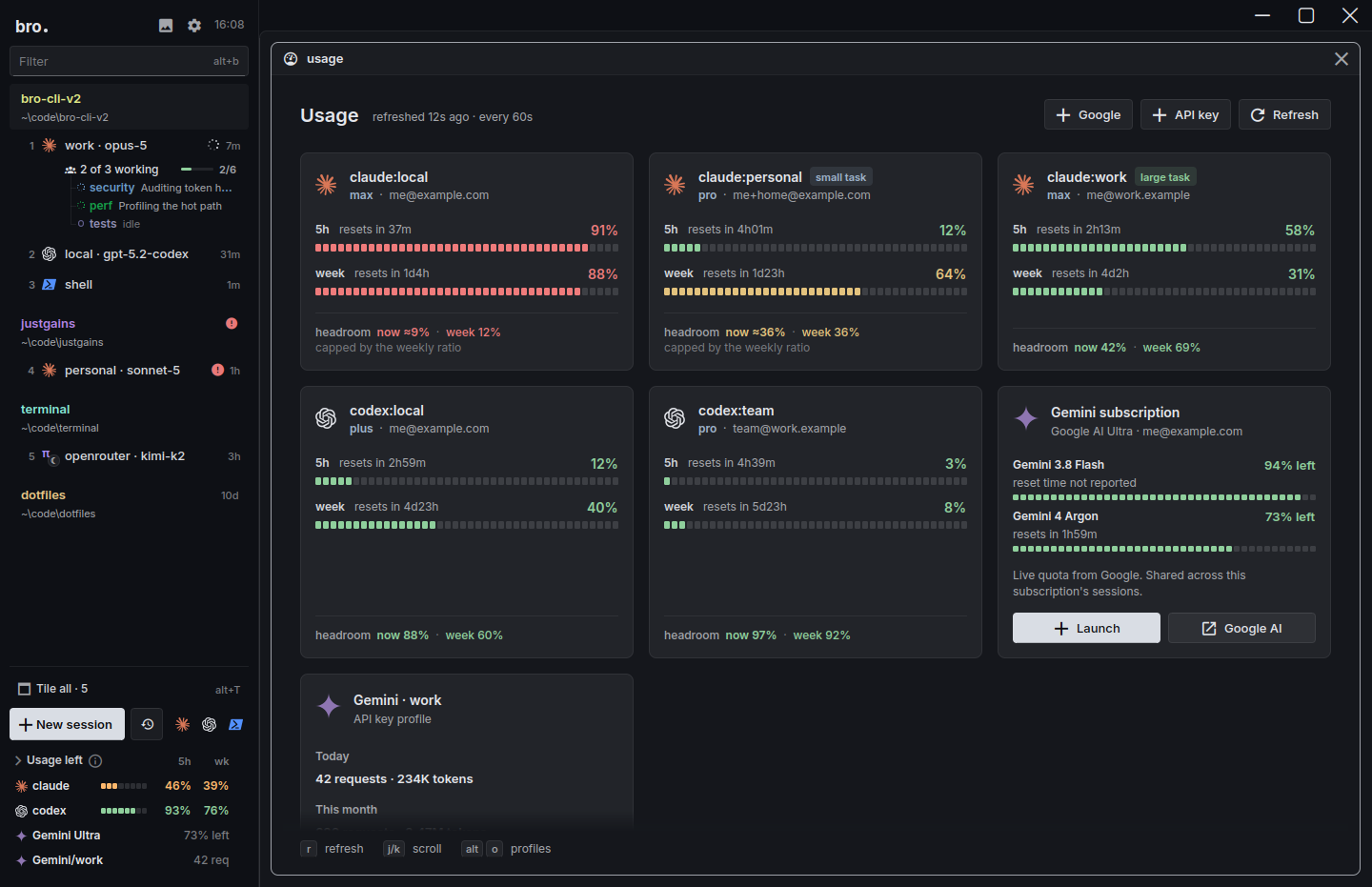
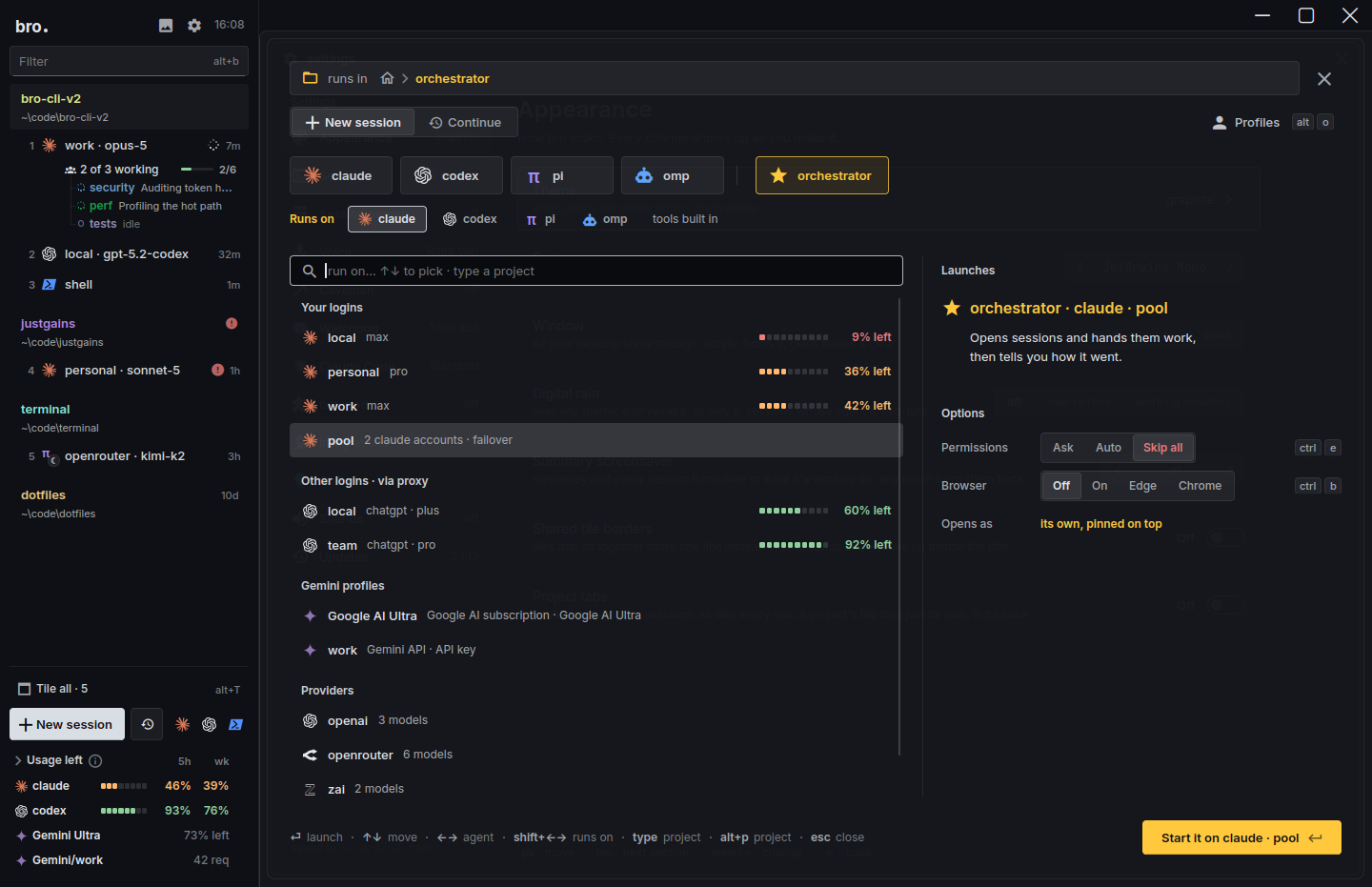
Bro manages the logins for you. You add one from the launcher, Bro runs the sign-in and keeps it in a profile of its own, and from then on any session can run on it. The sidebar shows the 5-hour and weekly limits left on each login. In proxy mode Bro sends new conversations to the login with the most room, and when one hits its limit the same request moves to the next, before the agent has seen an error.
Add a loginPick Claude, ChatGPT or Gemini in the launcher. No terminal tab, no typing /login.
Bro signs you inIt runs the sign-in, keeps the login in a profile of its own and flags one that needs attention before a session finds out.
Use it anywhereAny session can run on any login. Proxy mode spreads the work and hands off the moment one hits its limit.πω
Every login with what's left on it. Real screen, demo accounts.
How T3 Code handles it
T3 Code has a good start on this. Codex connects with ChatGPT inside the app, extra ChatGPT accounts sit in the model picker, and Cursor and Antigravity sign in from the app too. Claude and the rest still need their own CLI logged in on the machine, and a second Claude account means a second CLAUDE_CONFIG_DIR and a claude auth login in a terminal. Its FAQ is direct about why it stops there:
"I don't think T3 Code is the right place to manage a pile of accounts."
For a bigger pool it points to CLIProxyAPI, a separate self-hosted proxy, and shows the pooled limits once you connect one. Since 0.1.5 new threads also skip a provider that just hit its limit, so it's moving this way. Bro has the whole piece built in, so there's nothing extra to run.
Bro's edge
Many projects at once.
Real work is rarely one repo. A normal day is a mobile app, an API, a marketing site and a scripts folder, each with an agent or two running, and the hard part is knowing which of them needs you.
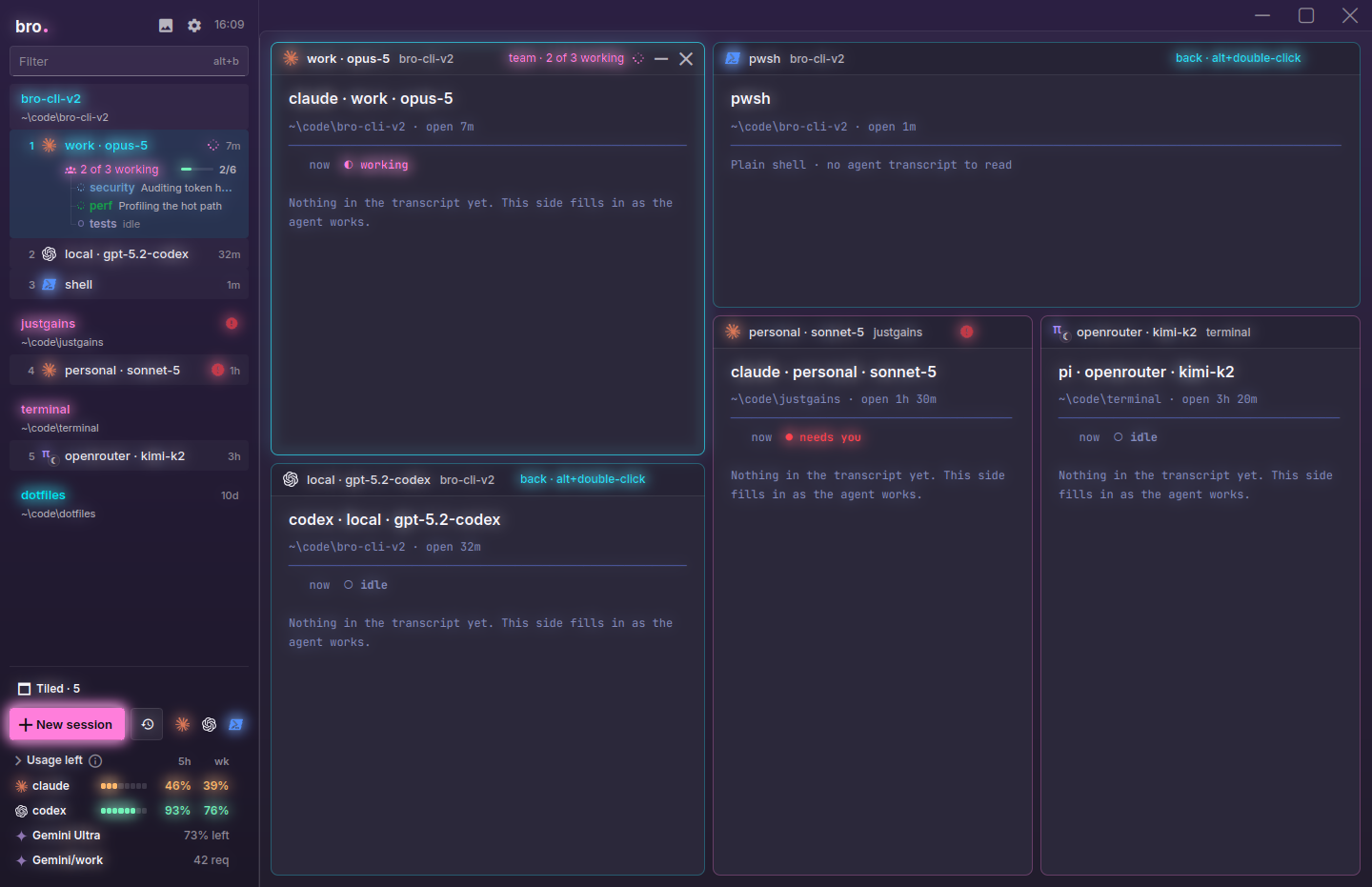
Bro groups every session by project, the git root or the folder when there's no repo, and rolls the state up to the project's row, so you see live counts and who's waiting without opening anything. AltA jumps to whoever needs you, AltShiftT tiles everything at once, and the phone app groups its chat list the same way.
Coordination follows the same shape. Each project can have its own orchestrator, and a root orchestrator above them opens or reuses those and takes your voice, your phone and your schedule: say "open a session in justgains" and it finds the project. Bro also keeps projects apart. Claude Code lets any session on a machine find and message any other, so a session in one repo can be interrupted by work in an unrelated one, and Bro scopes that to the project by default.
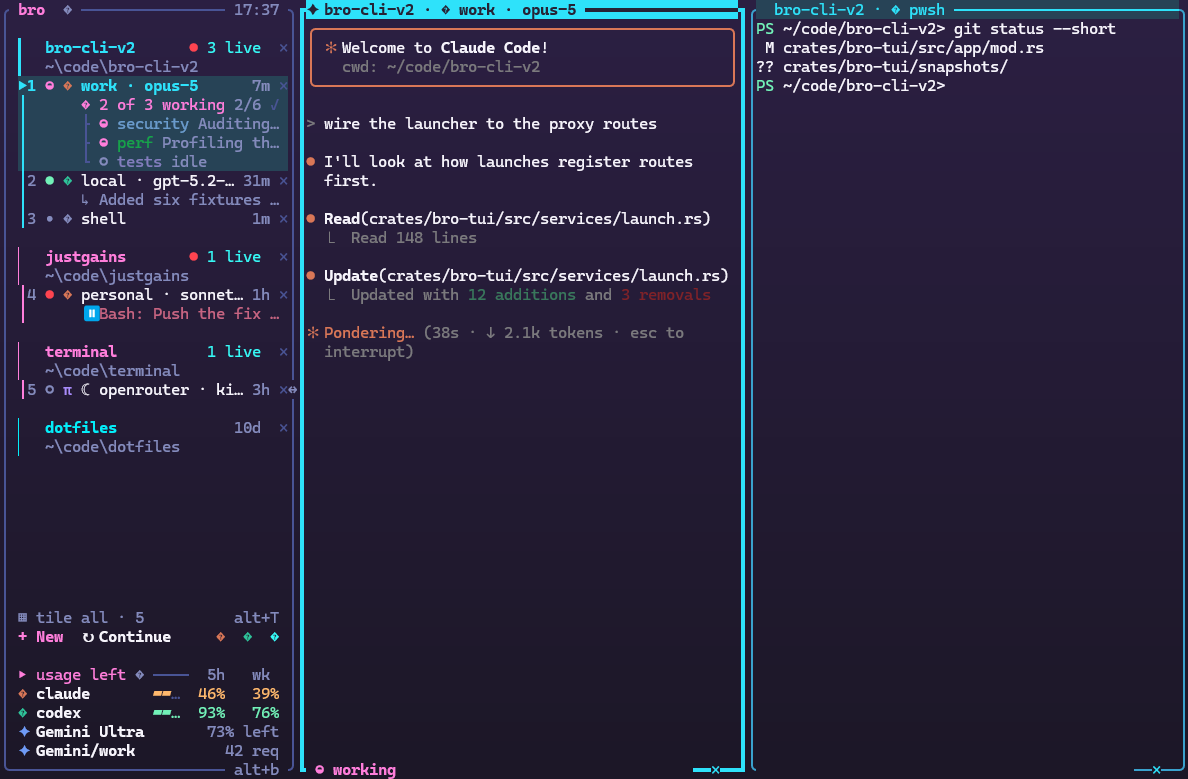
The terminal UI's sidebar: four projects, their live sessions and who needs you.
Every session across every project, flipped to its card: login, folder, branch, state and the last thing said.
T3 Code's default sidebar is one list of threads from every project, ordered by when each last came back to you, with a collapsed Working section for the busy ones. Grouping by project is a beta setting in Labs, and in that mode threads can't be dragged and the Working section turns off. Search is good: CtrlK finds threads across connected machines by title, branch, pull request or project. What its docs don't describe is a coordinator for each project or agents scoped to their own. Its MCP server lets one outside agent start threads in every project instead.
Bro's edge
A terminal UI and a desktop app, for every use case.
Bro is one workspace that opens two ways. The desktop app draws the terminals on the GPU. bro-cli draws the same workspace in your terminal, with the same sessions, sidebar, launcher, views and keys. Over SSH, in tmux or on a machine with no display, plain bro opens the terminal version by itself, and bro --view opens more windows on whatever is already running.
So the answer to "where do I run my agents" is the same everywhere: at your desk, on a server, on a laptop shut in a bag, from your phone. Only a few things need a window, such as focus mode and the media panel. The sessions, the sidebar and the keys are the same in both.
No terminal UIIts t3 command starts a server and opens a web app, so on a box you only reach over SSH you drive T3 Code from another device, not from the terminal.
Desktop appbroWindows, macOS and Linux, with the terminals drawn on the GPU.
Terminal UIbro-cliThe same workspace over SSH, in tmux or with no display.
Another windowbro --viewMore windows on the sessions that are already running.
PhonePair onceiPhone and Android, paired to your computer.
Scripts and voicebro ctlThe orchestrator's MCP tools from any shell, or hold Right Win and talk.
Bro's edge
Any model in any agent.
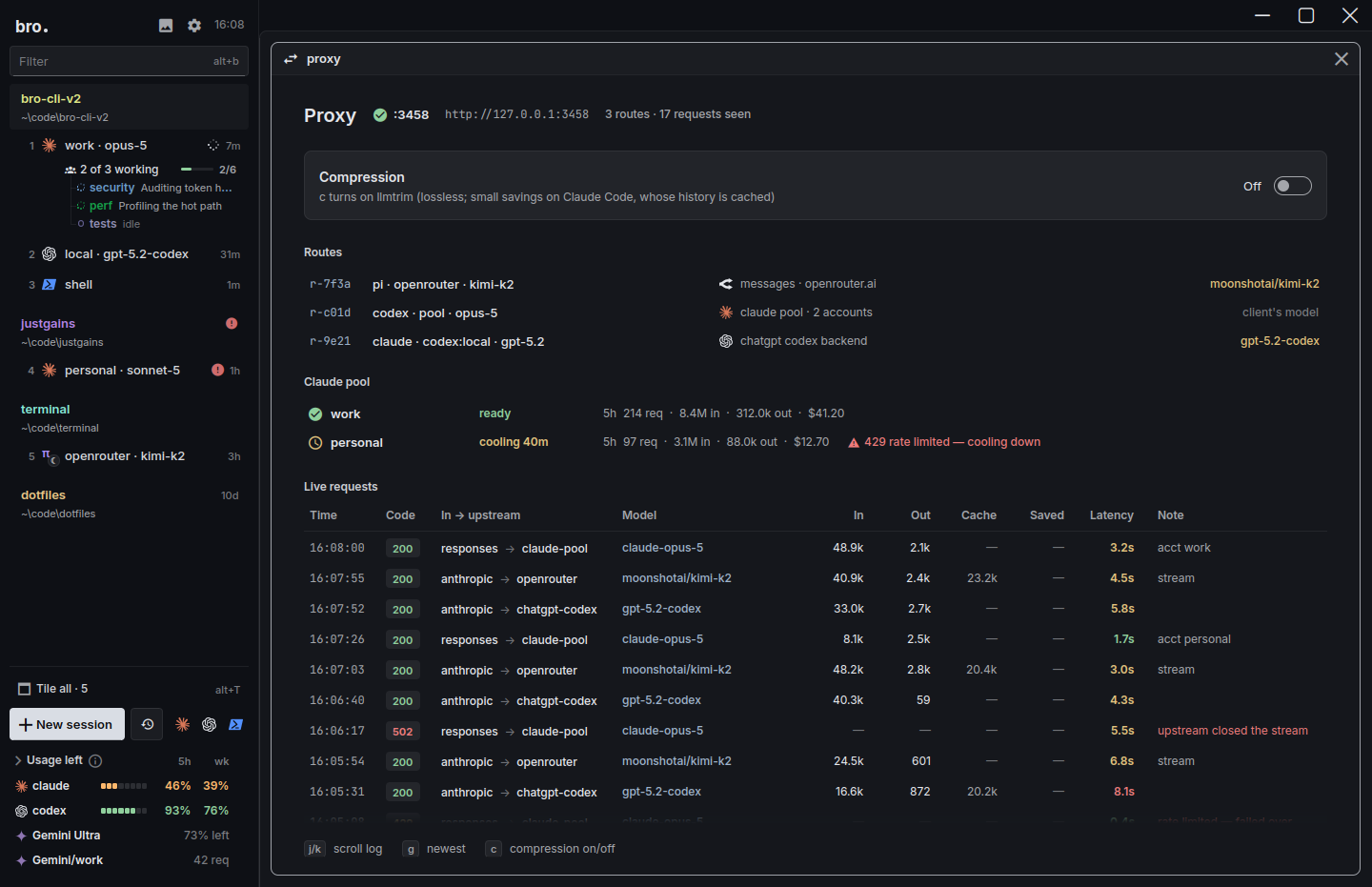
Bro's proxy translates between the Anthropic Messages, OpenAI Chat, OpenAI Responses and Gemini APIs as requests fly by. Claude Code can run on GPT, Gemini, Kimi, DeepSeek or Grok, and Codex, Pi and omp can run on Claude, with tools, images and thinking coming through intact. There are 16 providers in the catalogue, OpenRouter alone adds 463 live models, and Ollama and LM Studio cover the ones on your own machine.
ClaudeOpus 5, Sonnet 5, Fable 5
OpenAIGPT and Codex logins
GeminiGemini 4 Argon
OpenRouter463 live models
xAIGrok 4
DeepSeekChat, Reasoner
MoonshotKimi K2
Z.aiGLM 5.3
MetaMuse Wonder 1.0
MistralLarge, Codestral
GroqLlama 3.3 70B
OllamaLocal models
LM StudioLocal models
The proxy view: which agent runs on which login or provider, and every request as it passes.
T3 Code covers part of this by hand. You can add a provider instance with your own keys and a custom endpoint, and its Claude guide has an OpenRouter recipe. What it won't do is local models. Its FAQ answers the question in one line:
"Locally runnable models are not capable of meaningful engineering work."
If you disagree, or you want a private model on a private repo, T3 Code isn't the tool.
Bro's edge
The real agent, not a rebuild.
T3 Code's FAQ describes its goal in one line: "Every harness feels nearly identical in here." That's a design choice, and a good one if you want a single interface. It also means T3 Code draws its own view of each agent from the SDK or protocol underneath, so what you see is T3's rendering of what that layer exposes.
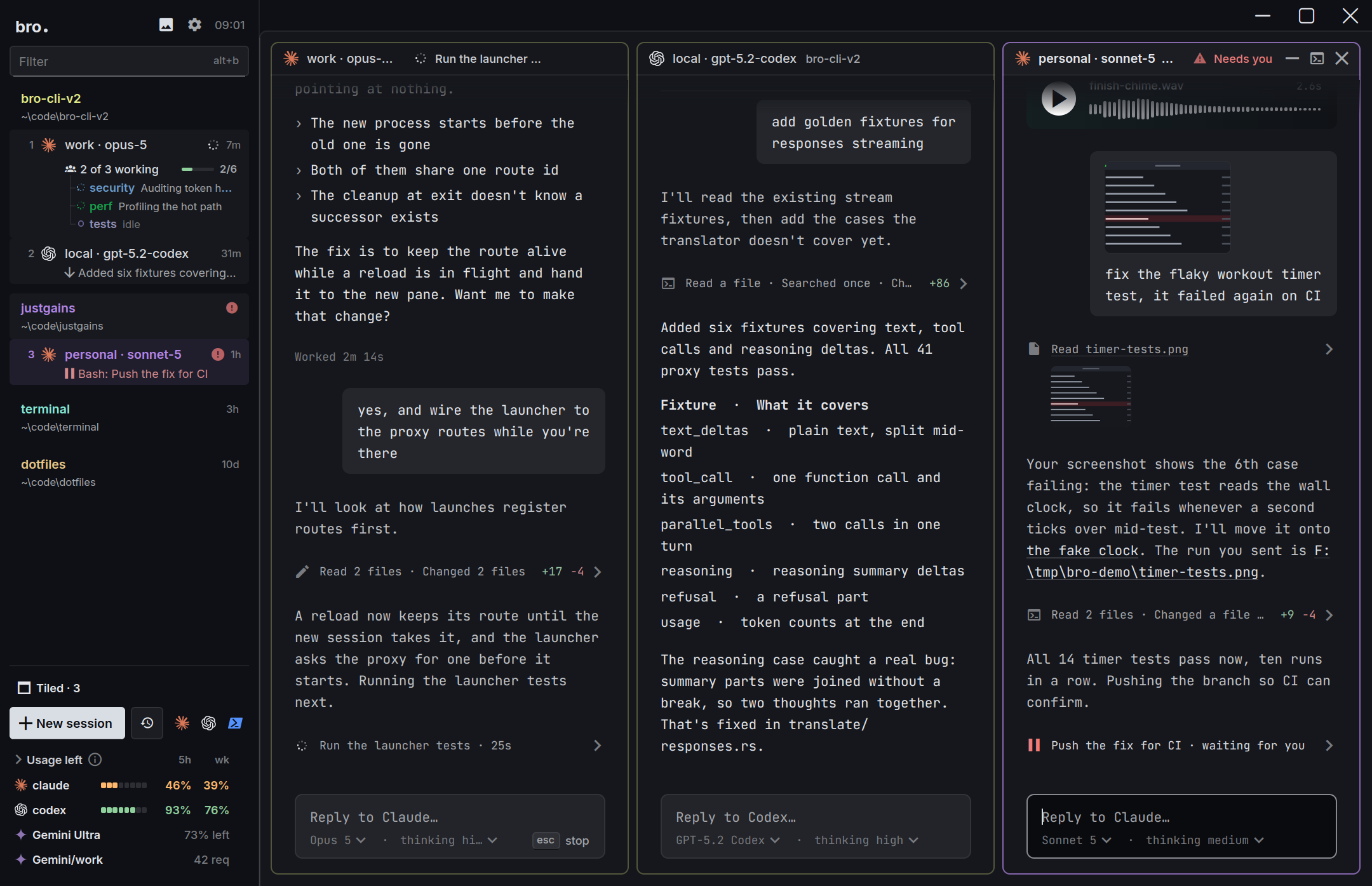
Bro goes the other way. Each session is a real terminal, with kitty keyboard support, ligatures and 10,000 lines of history, so Claude Code and Codex look and behave exactly as they do on their own, and a new release works the day it ships. When you'd rather read than watch a terminal, AltF flips every Claude Code and Codex session into focus mode: big clean type, one quiet line for each run of steps, questions and permission prompts as buttons, and a model and thinking picker in the footer.
Terminals: the agents exactly as they run on their own.
Focus mode: the same session as a conversation.
One practical side effect, straight from T3's FAQ: T3 Code drives Claude through Anthropic's Agent SDK, and the FAQ says Agent SDK usage drains your 5-hour limit faster than Claude Code does, a problem it says it has reported to Anthropic. Its tracking issue measures roughly 1.6 to 1.7 times. Bro launches the claude binary itself, so that path never comes up.
Bro's edge
The crew behind the window.
Bro's orchestrator is a session that runs the others. It opens sessions, hands out tasks, waits for the answers and tells you when it's done. You can ask it out loud (hold Right Win, say "open a session in justgains"), from your phone, or on a schedule: in 10m, at 17:30, daily 09:00.
Under it are 26 MCP tools that any shell can call as bro ctl, and watchdogs. Press CtrlSpaceW on a session and list its milestones. When the agent goes idle, a fresh reviewer reads the chat and the code, checks the work against the milestones and sends the next task.
T3 Code has real answers here too. A thread can delegate to child threads on any provider, an MCP server lets outside agents (Claude Code or Codex in your own terminal, even ChatGPT) start and message threads, scheduled tasks fire on an interval, at a fixed time or from a webhook, and /goal keeps a Codex or Claude run going until its goal is met. What Bro adds is a second pair of eyes: a watchdog reads the chat and the code, checks the milestones you set and hands the agent its next task, and the whole crew answers to your voice.
Your phone, your server, your sessions.
This is T3 Code's strongest ground, and we'll say so plainly. Its iOS and Android apps are on the App Store and Google Play. They send push notifications when an agent finishes or needs approval, show Live Activities on iPhone, and connect through T3 Connect, SSH, Tailscale or a pairing link.
Bro's phone app pairs with Bro on your computer over your own network or Tailscale. It lists every session like a chat, with a spinner while it works, an alert when it needs you and a check when it's done. The terminal is a tap away with its key row, dictation runs on the phone, and tapping a file path opens the file at the right line. It isn't on the stores yet, so for now T3 Code is the one you can install tonight.
Both are built so work outlives the window. Bro's sessions live in a session server, so closing Bro, updating it or crashing it doesn't end them, and the next Bro picks them up, on Windows too. T3 Code can run as a background service on Linux and macOS. On Windows its docs say background services aren't supported, so the desktop app or t3 serve has to stay running.
Every session, grouped by projectQuestions come as buttonsTap a path, land on the line
Where T3 Code is ahead.
Plenty. If any of these is your daily work, take them seriously.
Git, end to end. Branch and worktree controls in every thread, pull requests created and merged in the app, review guides, files marked as viewed, linked pull requests and GitHub stacks, across GitHub, GitLab, Bitbucket, Azure DevOps and Forgejo. Bro leaves git to your agents and your tools.
Phones and remote machines. Store apps rated 4.9 on iOS, push alerts, a web client at app.t3.codes and T3 Connect for reaching a box from anywhere.
Breadth. Nine providers are first-class, including Cursor, Grok Build, OpenCode and Antigravity. Bro has four, plus a plain shell for everything else.
Fan-out and delegation. Pick several models in the composer and each gets its own thread and worktree, and a parent thread can hand work to a child on any provider.
More in the window. Shared browser tabs your agents can drive, an iOS Simulator and Android Emulator panel, viewers for PDFs, Office files and notebooks, and agents that watch a pull request and wake on a failed check.
Momentum. Over 32,000 stars, 60 stable releases and 641 nightlies in about eight months. Bro is young: the Rust rewrite started on September 29 and the desktop app landed on October 21. T3 Code, for its part, still labels itself Beta.
T3 Code: threads on the left, the chat in the middle, branch, changes and subagents on the right.
I want Claude Code running on a GPT, Gemini or Kimi model Bro
I want a model that runs on my own machine Bro
I have several logins and keep hitting limits Bro
I want agents working through the night Bro
I run a lot of projects and want an orchestrator for each Bro
I want the same sessions in a window and in a terminal over SSH Bro
I want every agent in one identical chat view T3 Code
I review and merge pull requests all day T3 Code
I want a phone app from the App Store tonight T3 Code
I use Cursor, Grok Build or OpenCode as my main agent T3 Code
You don't have to choose. Both sit on top of the agent CLIs you already have installed, so they don't fight. Run T3 Code for review and Bro for the crew, and see which one you reach for.
Questions people ask.
Is T3 Code free?
Yes. It's MIT licensed and you bring your own agent subscriptions. T3 Connect, its remote-access service, is free for up to 3 machines, and linking a T3 Chat account raises that limit.
Can I manage many projects at once in Bro?
Yes. Bro groups every session by project, the git root or the folder when there's no repo, and shows live counts and who needs you on each project's row. AltA jumps to whoever needs you, each project can have its own orchestrator, and a root orchestrator runs across all of them. T3 Code can show many projects too, though grouping by project is a beta setting there.
Does Bro have a terminal UI as well as the desktop app?
Yes. bro-cli is the same workspace in your terminal, with the same sessions, sidebar, launcher and keys. Over SSH or on a machine with no display, bro opens it by itself. T3 Code has no terminal UI: its t3 command starts a server and opens a web app.
Is Bro free?
Yes. Bro is MIT licensed and has no paid tier. You pay your model providers, the same as in T3 Code.
Can Bro run Cursor, OpenCode or Grok Build the way T3 Code can?
Not as first-class agents. Bro's built-in agents are Claude Code, Codex, Pi and omp. Any other command-line agent still runs in a plain shell session inside Bro, but it won't get the status tracking, focus mode or proxy routing.
Does Bro have pull requests and diffs like T3 Code?
No. Bro doesn't try to be your git client. Your agents commit and open pull requests the way they do in any terminal, and Bro shows what they're doing. If in-app review matters most to you, T3 Code is ahead.
Is there a Bro phone app?
There's an iPhone and Android app that pairs with Bro on your computer over your network or Tailscale. It isn't in the App Store or Google Play yet. T3 Code's phone apps are on both stores today.
Can I use Claude Code on a GPT or Gemini model in T3 Code?
Not through a built-in translation layer. T3 Code lets you add a provider instance with your own keys and endpoint, which covers some setups by hand. Bro's proxy translates between the Anthropic, OpenAI and Gemini APIs, so Claude Code can run on other providers' models and Codex can run on Claude.
Can I run T3 Code and Bro together?
Yes. Both sit on top of the agent CLIs you already have installed, so nothing conflicts. Some people keep T3 Code for review and Bro for the crew.
Try Bro next to what you run now.
Free and open source. It finds the agents you already have, so there's nothing to migrate.