Herdr just grew a native desktop app, so this is a closer race than it was a month ago. Both draw real terminals on the GPU. The difference is how each handles many projects, whether the terminal and the window agree with each other, and everything around the agents.
By the Bro.Tech team11 min read
Checked against the Herdr app 0.1.9, the Herdr TUI 0.9.5 and Bro 2.1.20. We make Bro, so we show our sources and where the others win.
Pick Herdr for the lightest, most open way to herd any agent, in a terminal or now a native app. Pick Bro for the whole workstation: managed logins, any model in any agent, an orchestrator that keeps a schedule, and a phone to carry it all.
Pick Bro if
You want a desktop app and a terminal UI on the very same sessions, not two programs that don't share agents
You run many projects at once and want an orchestrator for each, one above them all, and agents kept to their own repo
You want Claude Code on GPT, Gemini or Kimi, or a local model, with logins managed and their limits on screen
You want an orchestrator that runs on a schedule, puts a watchdog on idle agents and takes your voice
You want a phone app, a chat-style focus mode and no product analytics
Pick Herdr if
You want the lightest thing that works: a multiplexer for any command-line agent, in the terminal you already use
You want agents that start and wait on each other through a CLI and socket API, and a UI your own agent can rewrite
You want git worktrees and a Changes panel, and more than 20 agents recognized out of the box
You like momentum: over 46,000 stars on the TUI, nearly two million installs and a funded team
What each one is.
Herdr's desktop app and Bro's both landed in the last ten days, and both run real terminals drawn on the GPU. Herdr has older products underneath, so it's worth being clear which Herdr we mean.
Herdr
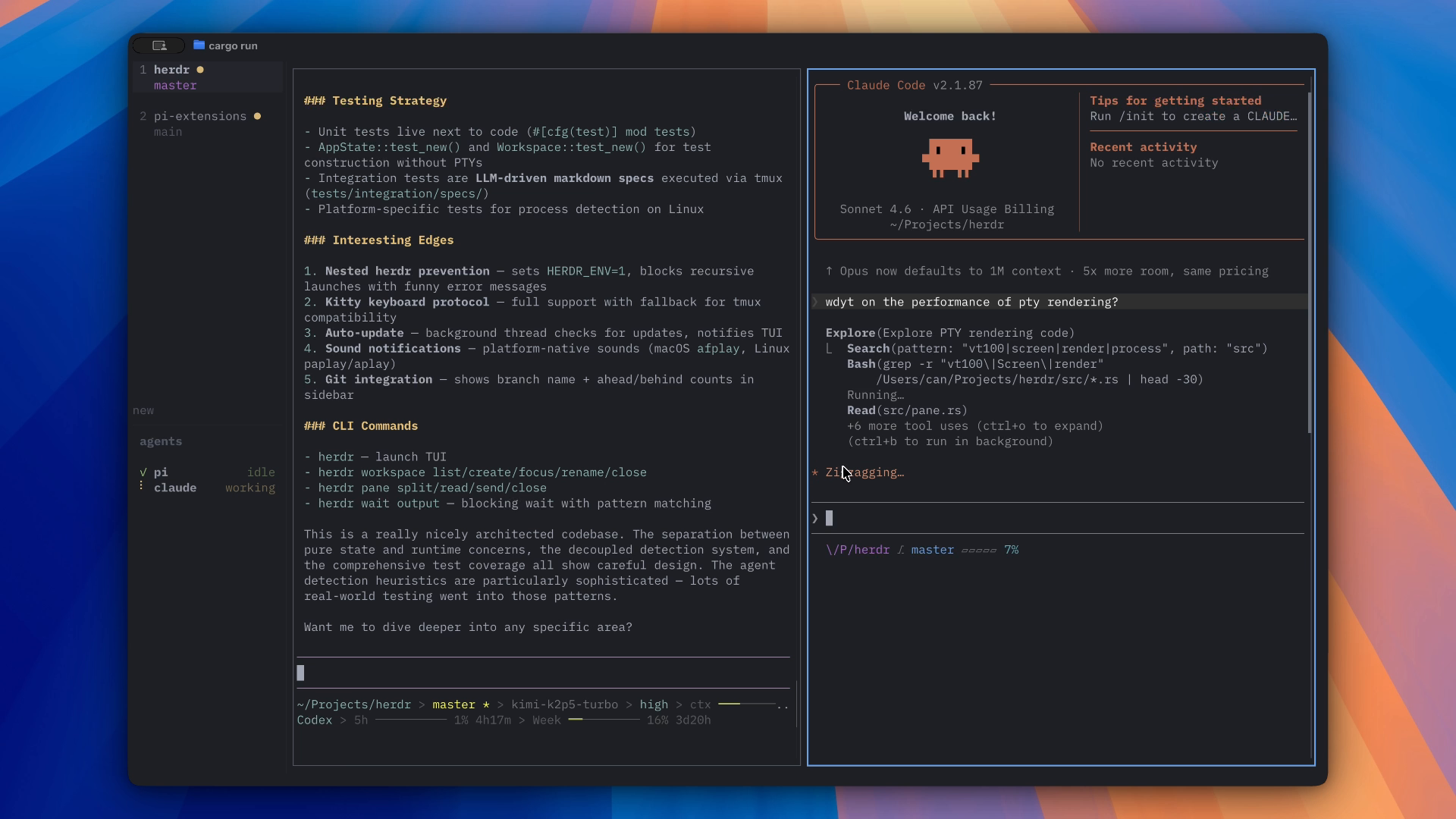
Three parts. The Herdr TUI is the original: a terminal app with its own server, 46,000 stars and about 1.9 million installs by its own count. herdr-core is a headless runtime that keeps terminals alive after you leave. The new Herdr app is a native window on top of core. The app and the TUI are separate programs, and Herdr says plainly that they don't share agents.
From
Herdr, Inc. (Can Celik, YC F26)
License
Apache-2.0
Runs on
App: Windows, Linux, Apple silicon Macs. TUI: Windows, macOS, Linux
Status
App 0.1.9, about a week old. TUI 0.9.5
Bro
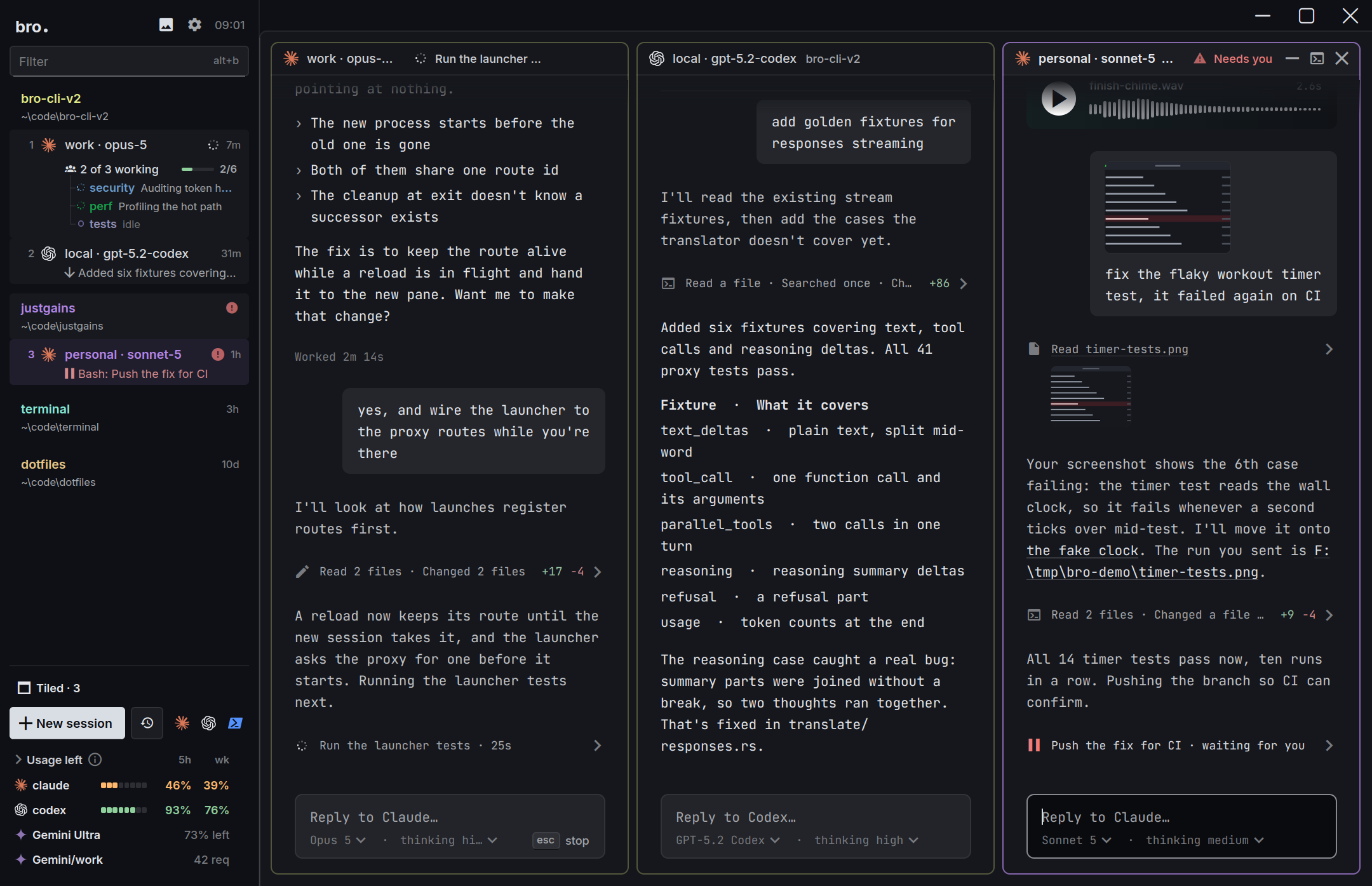
An agentic development environment. The desktop app and bro-cli, its terminal version, are one workspace with the same sessions, sidebar, launcher and keys, so you can open the same agents in a window at your desk or in a terminal over SSH. Around the terminals sit a translating proxy, an orchestrator, a phone app and a focus mode that reads like chat.
From
The JustGains team, built in Bro by agents running in Bro
License
MIT
Runs on
Windows, macOS, Linux, plus an iPhone and Android app
Status
Young: the desktop app shipped October 21
Row by row.
The same questions for both tools. A filled dot is a yes, a half dot is partly, a dashed one is a no. Because Herdr is two programs, a cell says which one it means when they differ. Flip the switch to hide every row where you'd get the same answer from either.
39 rows people actually choose on. Checked October 30, 2026.
Yes
Partly
No
19rows where Bro is ahead
14even
6rows where Herdr is ahead
Feature by feature: Bro, Herdr
Feature
BroDesktop, terminal and phone
HerdrNative app and terminal multiplexer
Where it runs
Desktop app
BroWindows, macOS and Linux, drawn natively on the GPU
HerdrNew native GPU app: Windows, Linux, Apple silicon Macs
Small downloadThe Windows download
Bro19 MB
Herdr24 MB
Terminal UI on the same sessions as the desktop appFor SSH and servers with no display
Brobro-cli: the same sessions, sidebar, launcher and keys
HerdrA TUI exists, but it's a separate program from the app
Phone app
BroiPhone and Android, not on the stores yet
HerdrNone. Use an SSH client with the TUI
Drive agents on another machine
BroTerminal UI over SSH, phone over your network or Tailscale
HerdrSSH machines in one sidebar
Many projects at once
Every project and its agents in one sidebar
BroGrouped by project by default, with live counts and who needs you
HerdrSpaces, each with its agents, in one sidebar
Jump to whoever needs you, whichever project
BroAlt+A jumps to the session that needs you
HerdrPriority sort puts waiting agents first
A coordinator for each project, and one over all of them
BroA project orchestrator each, and a root one above them
HerdrNot in its docs
Agents kept out of other projects' sessionsClaude Code lets any session message any other
BroClaude sessions only reach their own project by default
HerdrNot in its docs
Several windows on the same sessions
Brobro --view opens another window on the running sessions
HerdrThe TUI serves several clients at once
Agents and models
Agents with first-class support
BroClaude Code, Codex, Pi, omp. Anything else runs in a shell tab
Herdr20+ named, and any program runs in a terminal
The agent's own terminal, untouchedNot a window rebuilt around its SDK
BroReal terminals, kitty keyboard protocol
HerdrReal terminals, run as they are
A clean chat view of the session
BroFocus mode in the desktop app
HerdrTerminals only
Any model in any agentClaude Code on GPT, Codex on Claude
BroTranslating proxy, 16 providers
HerdrNo model layer. The agent's own command picks the model
Local models
BroOllama and LM Studio
HerdrWhatever your agent supports. No model layer
Logins and limits
Managed loginThe app runs the sign-in and keeps it fresh
BroSign in once, Bro keeps every login ready
HerdrEach agent logs in on its own, in its terminal
Several logins per agent
BroProfiles side by side
HerdrOnly by hand, with your own launch commands
Live 5-hour and weekly limits
BroMeters in the sidebar and a Usage view
HerdrNone built in
Hands off to the next login at a limit
BroProxy mode, before the agent sees an error
HerdrNone
Orchestration
An agent that opens and runs other agents
BroThe orchestrator opens sessions and hands out tasks
HerdrAgents start, prompt and wait on each other through its CLI
Scheduled prompts
Broin 10m, at 17:30, daily 09:00
HerdrNot in its docs
A reviewer that keeps an agent working while you're awayReads the chat, checks milestones, sends the next task
BroWatchdogs
HerdrNot in its docs
One prompt to several agents at once
BroAsk the orchestrator to open several sessions on one task
HerdrScripted on its CLI
Control it from a script or MCP
Brobro ctl and 26 MCP tools
HerdrCLI, socket API and a skill. No MCP server
Voice
BroPush-to-talk to the orchestrator, dictation on the phone
HerdrNone
Sessions and attention
Sessions survive closing the app
BroA session server keeps them running, even through a crash or update
HerdrClose it, update it, crash it: they keep running
Agents pick up their conversations after a reboot
BroClaude and Codex resume where they were
HerdrThe TUI does for supported agents. The app starts fresh shells
Told when an agent needs you
BroSidebar status, sounds and phone banners
HerdrSidebar status, sounds and toasts
Code, git and review
Git worktree per task
BroLeaves git to your agents and tools
HerdrWorktrees as spaces, in the app and the TUI
Diffs, pull requests and review in the app
BroYour agents and git client do that
HerdrA Changes panel with diffs and commit. No pull requests
Editor and file tree
BroOpens files from links in a preview. No editor
HerdrA read-only Files panel
A browser next to the agent
BroPreviews HTML files and media beside the session
HerdrNone
Make it yours
Themes
Bro57, with 19 bundled terminal fonts
HerdrA few built in, custom JSON themes
Plugins, or a UI your agent can rewrite
BroThemes, Quips and skills, no plugin API
HerdrMods and layouts the agent edits, 1,900+ TUI plugins
Sound packs for finished and waiting
Bro376 packs
HerdrTwo bundled sounds, replaceable
Manage skills for every agent in one place
BroA Skills view that installs across agents
HerdrDoesn't manage skills or MCP servers
Cost and license
Open source
BroMIT
HerdrApache-2.0
Free to use
BroYou pay your model providers
HerdrYou pay your model providers
No product analytics
BroNone in its source
HerdrApp: on by default, off in Settings. TUI: none documented
Product names, logos and screenshots belong to their owners and appear here only to identify and compare the products.
Bro's edge
Managed login. Sign in once.
Run three agents and you're quietly managing three sign-ins, often two accounts each: work and personal, Claude and ChatGPT, plus whatever Gemini is doing this week. Most tools leave that to you, and you find out a login ran dry when an agent stops halfway through a task.
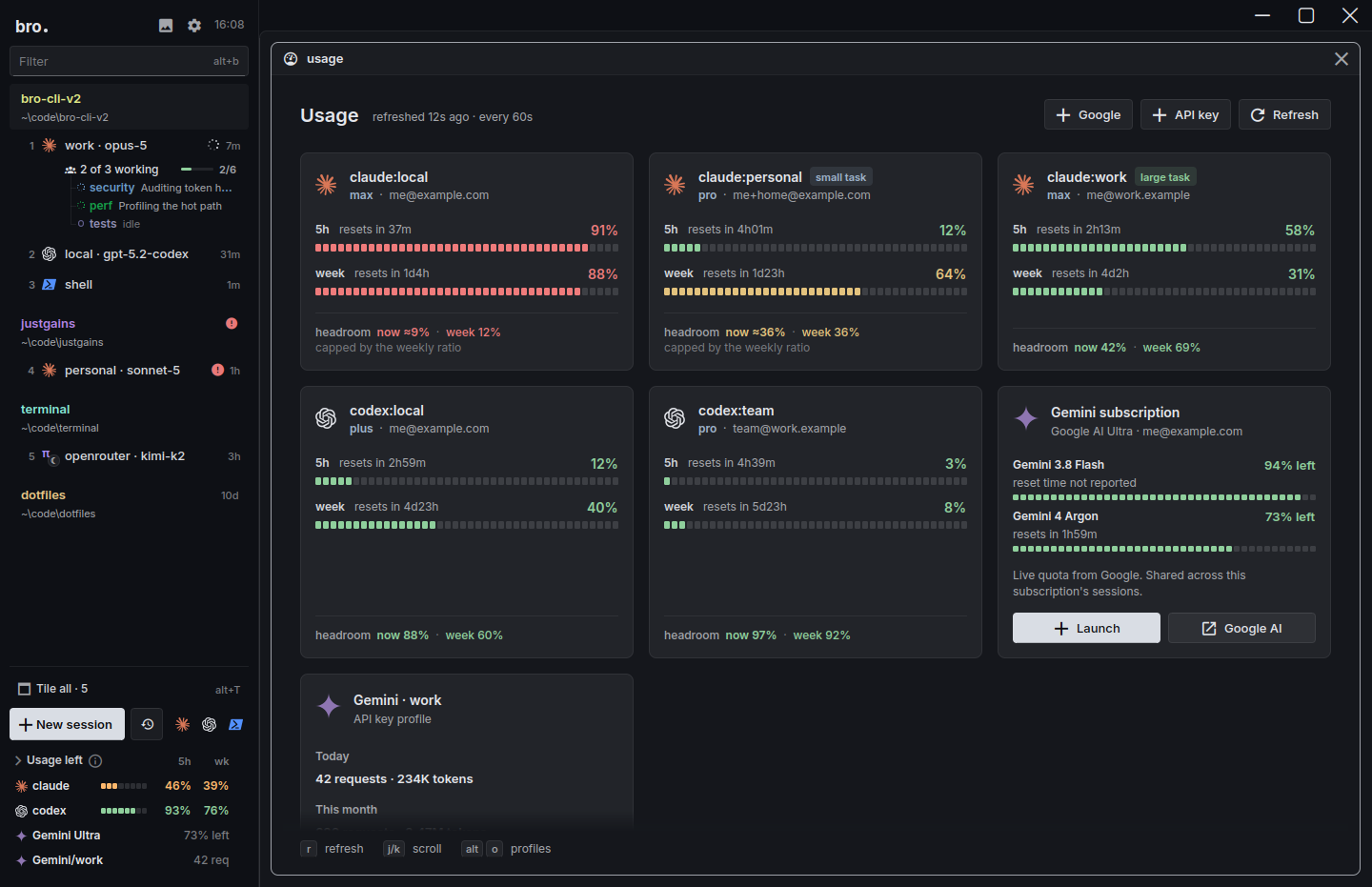
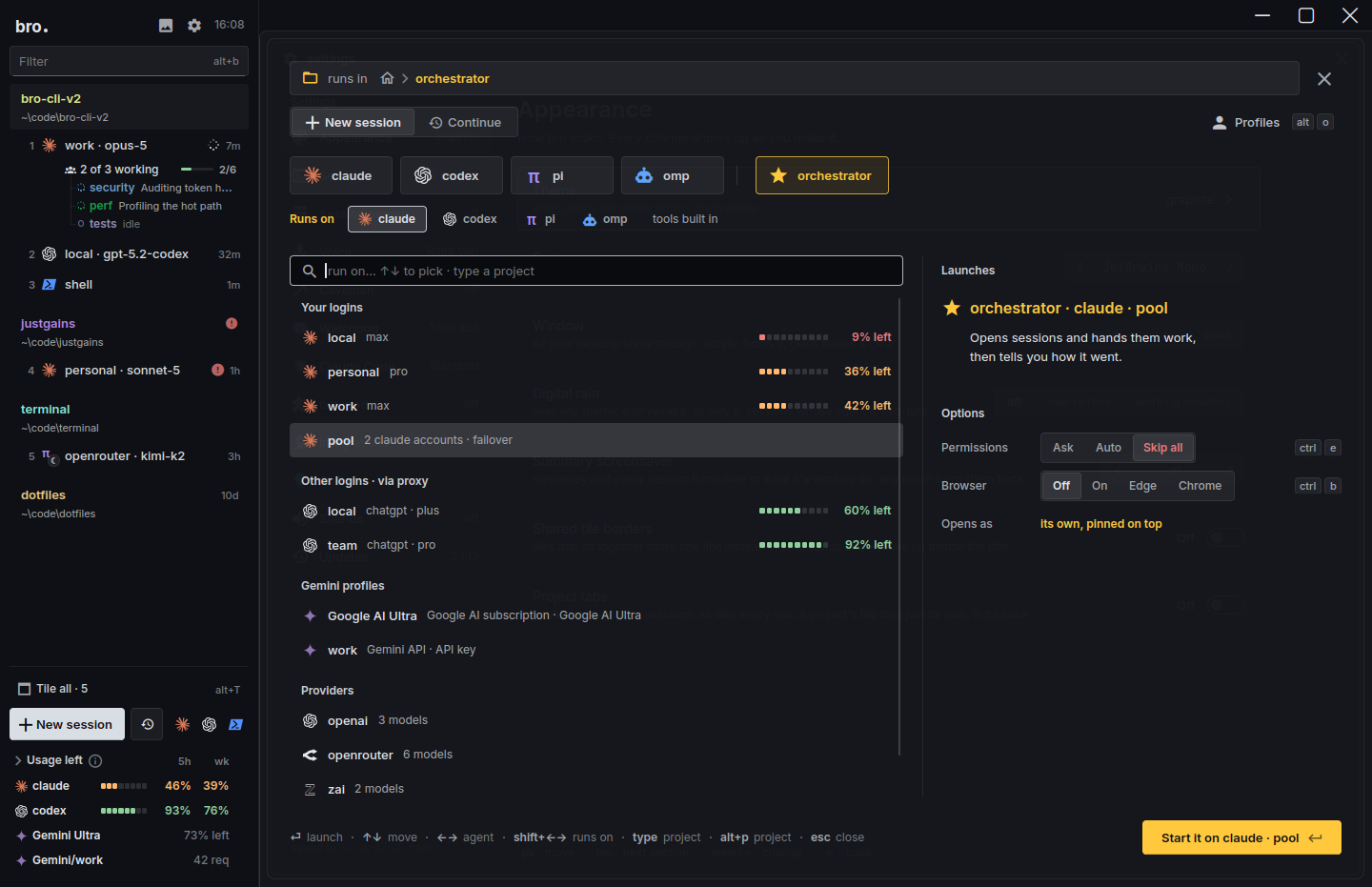
Bro takes it over. Add a login from the launcher and Bro runs the sign-in, keeps it in a profile of its own and flags one that needs attention before a session finds out. After that any session can run on any login, the sidebar shows what's left on each, and in proxy mode a login at its limit hands its work to the next one before the agent has seen an error.
Add a loginPick Claude, ChatGPT or Gemini in the launcher. No terminal tab, no typing /login.
Bro signs you inIt runs the sign-in, keeps the login in a profile of its own and flags one that needs attention before a session finds out.
Use it anywhereAny session can run on any login. Proxy mode spreads the work and hands off the moment one hits its limit.πω
Every login with what's left on it. Real screen, demo accounts.
How Herdr handles it
It doesn't, on purpose. There's no Herdr account, no profiles for several logins and no usage meters. Each agent signs in on its own inside its terminal, and a second Claude account means a custom launch command with its own environment. Its maker describes the stance in one line, and it's a consistent one:
"Let my agent integrate with your product, don't offer me another agent."
The upside is that Herdr never touches your credentials. The cost is that logins and limits stay your chore: its welcome screen suggests asking your own agent to build a cost meter as a mod. Several logins are your call either way. Use accounts you own, and read each provider's terms first.
Bro's edge
Many projects at once.
Run enough agents and the problem stops being any one of them. It's six projects with two agents each, and one that has quietly been waiting on you for an hour.
Herdr handles this well. Its app organises work into spaces (the TUI calls them workspaces) with tabs and panes, and an agent's state rolls up to its space and its tab. The Agents list puts waiting agents first, lets you pin, can group by space, nests worktrees under their repo, and shows spaces on other machines in the same sidebar.
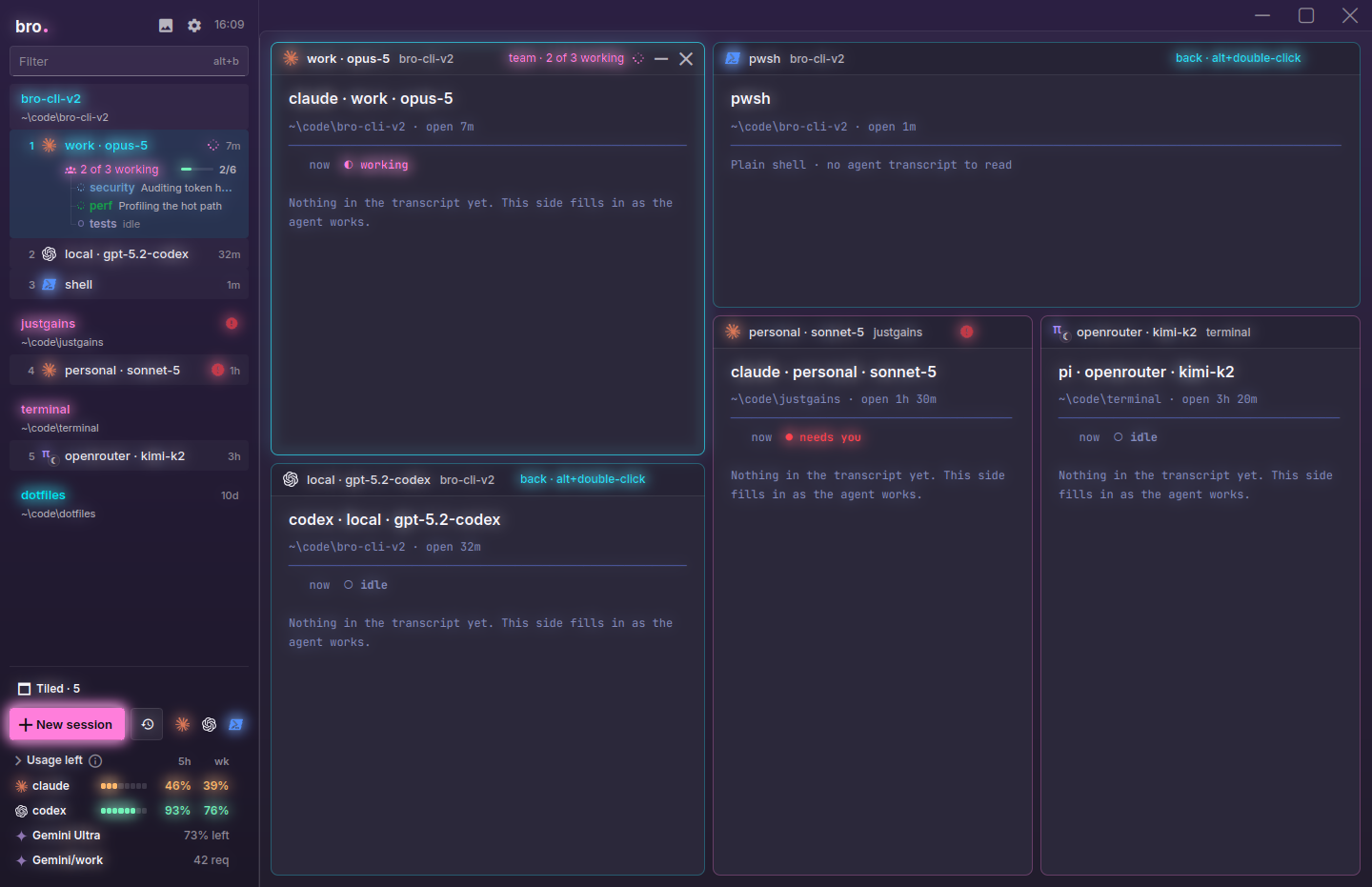
Bro groups sessions by project too, the git root or the folder when there's no repo, and rolls the state up to each project's row. AltA jumps to whoever needs you. Where it goes further is coordination. Each project can have its own orchestrator, and a root orchestrator above them opens or reuses those and takes your voice, your phone and your schedule: say "open a session in justgains" and it finds the project. By default Claude sessions can only find and message sessions in their own project. Claude Code on its own lets any session on a machine reach any other, and nothing in Herdr's docs changes that.
Herdr's sidebar: spaces on this computer, a MacBook and a VPS, one marked Needs you.
Bro's session cards: login, folder, branch, state and the last thing said, for every project.
Herdr has both a terminal app and a desktop app, which is more than most tools. They're separate programs, though. A terminal you start in one doesn't show up in the other, and after a reboot the TUI can resume supported agents' conversations while the app brings back fresh shells in their last folders.
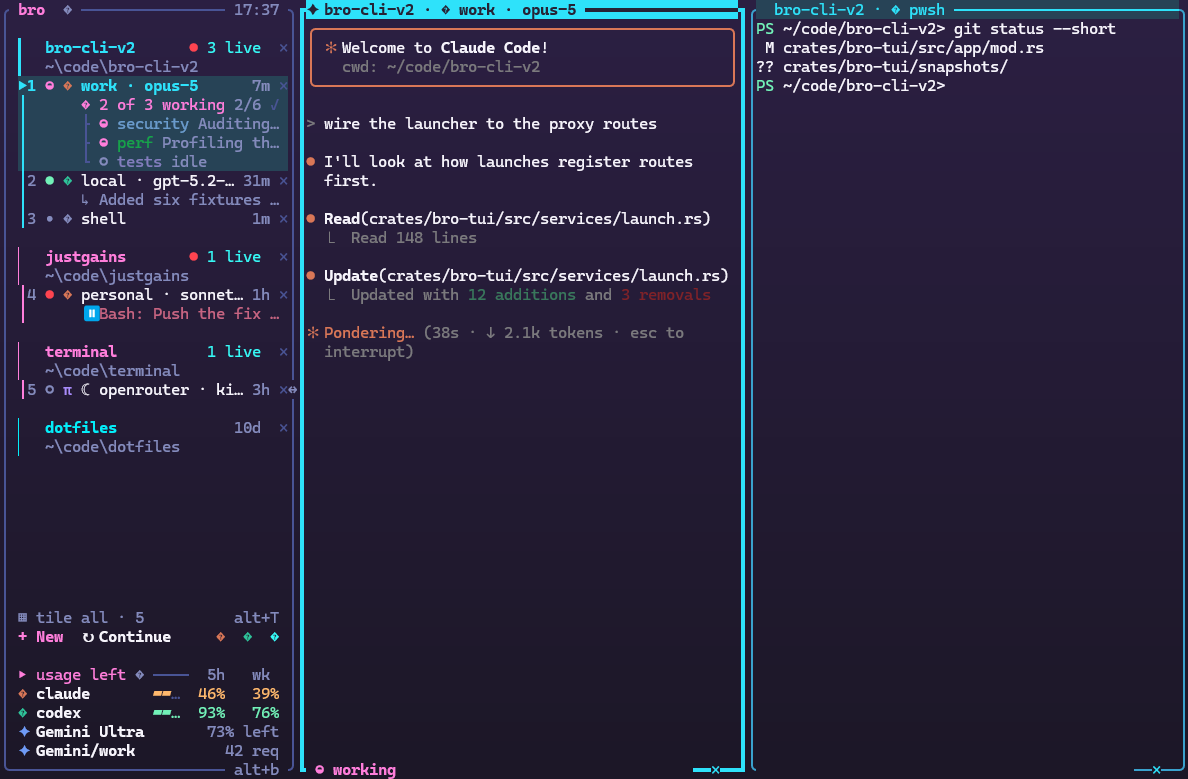
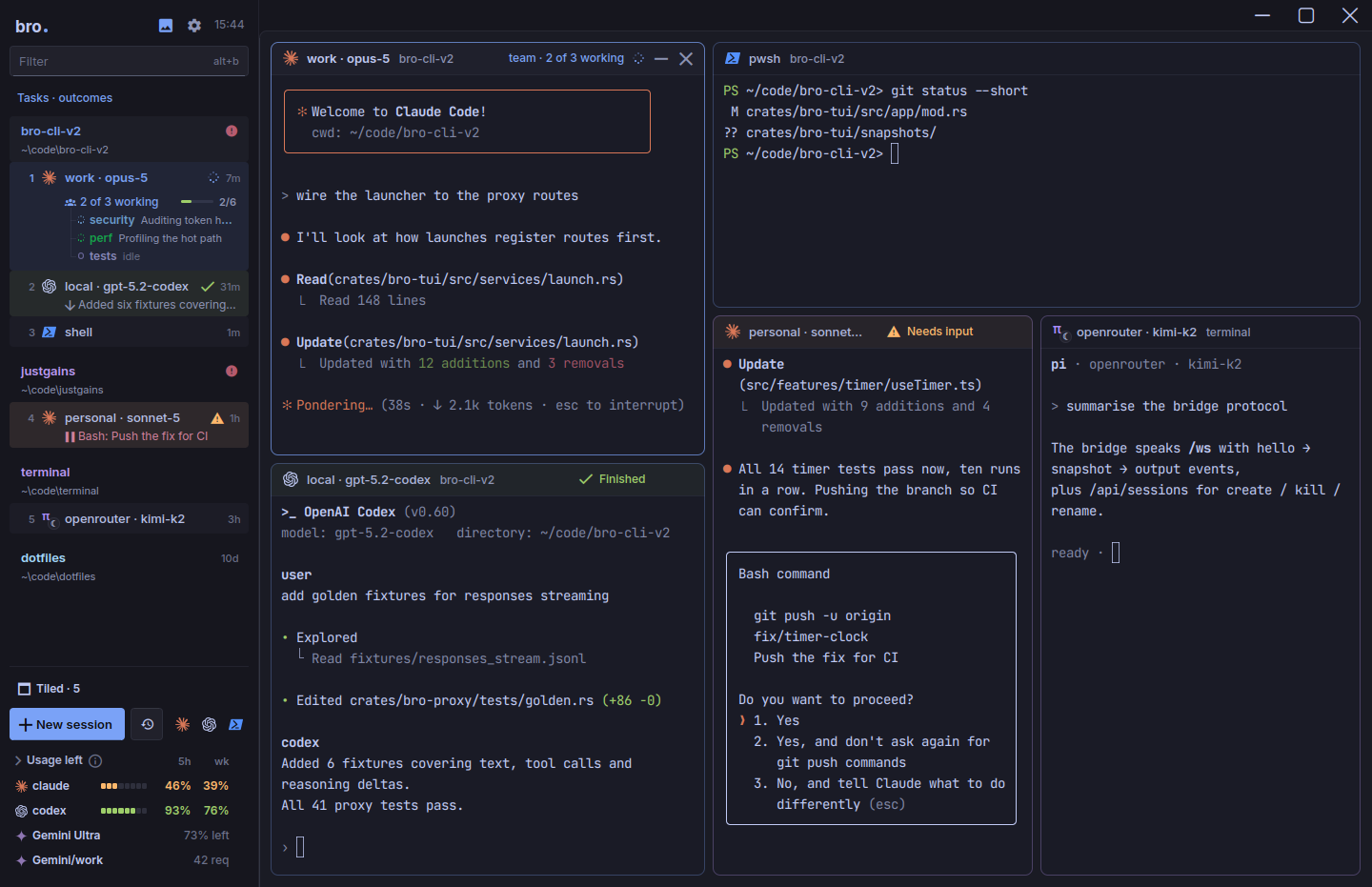
Bro treats the window as a view. The desktop app and bro-cli are one workspace, with the same sessions, sidebar, launcher, views and keys, and the sessions live in a server of their own, so closing Bro, updating it or crashing it doesn't end them. Open the app at your desk, SSH in from a train, add bro --view for another window, and each shows the same agents. After a restart Claude and Codex resume their conversations where they left off. Only a few things need a window, such as focus mode and the media panel.
Desktop appbroWindows, macOS and Linux, with the terminals drawn on the GPU.
Terminal UIbro-cliThe same workspace over SSH, in tmux or with no display.
Another windowbro --viewMore windows on the sessions that are already running.
PhonePair onceiPhone and Android, paired to your computer.
Scripts and voicebro ctlThe orchestrator's MCP tools from any shell, or hold Right Win and talk.
Bro's edge
Keep the agent you like. Pick the model.
Herdr has no model layer. Whatever model an agent uses is set by that agent's own command line, and API keys pass through as ordinary environment variables. That's tidy, and it also means Claude Code stays on Claude and Codex stays on OpenAI.
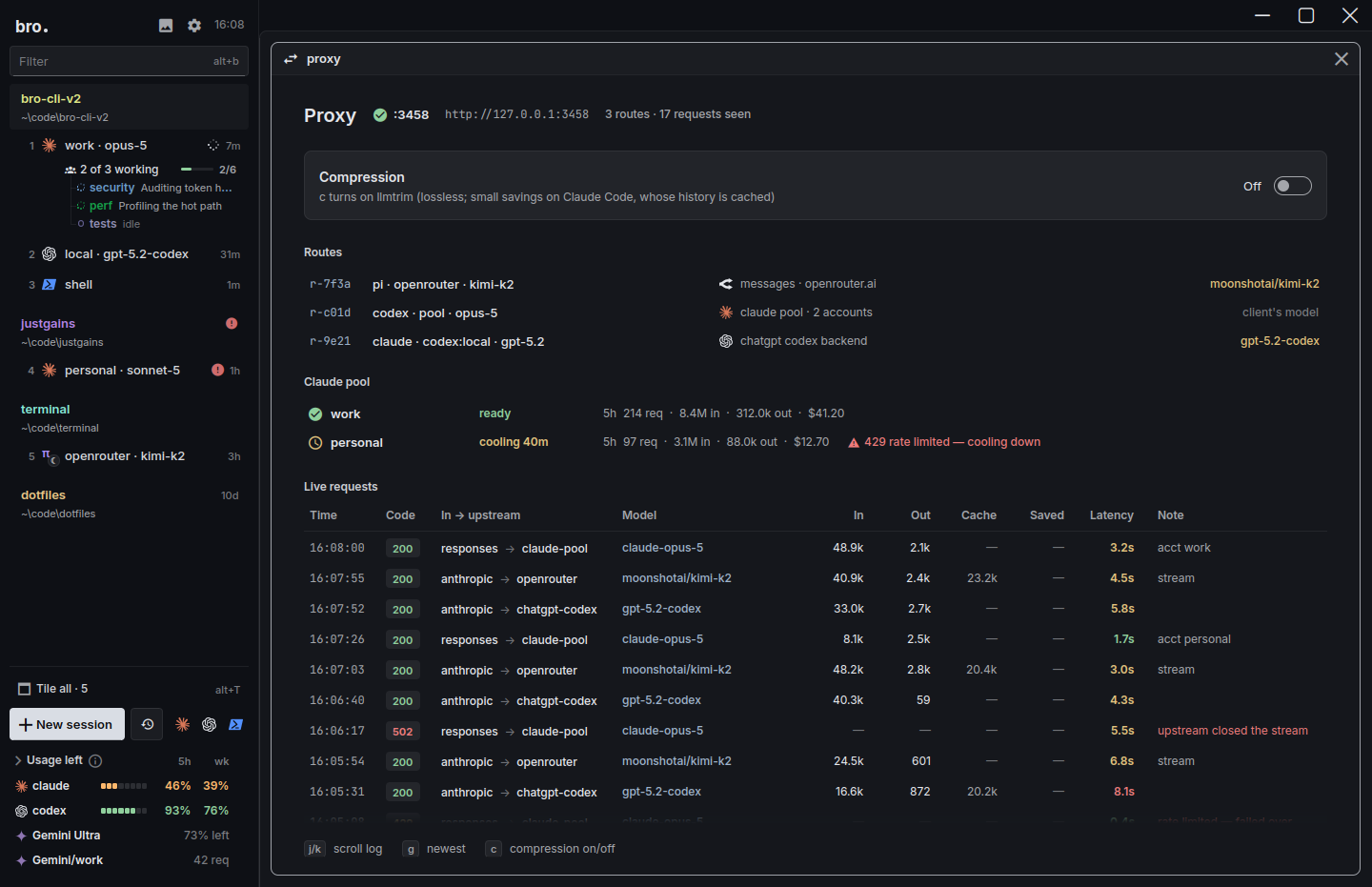
Bro puts a translating proxy in the middle. It speaks the Anthropic Messages, OpenAI Chat, OpenAI Responses and Gemini APIs, so Claude Code can run on GPT, Gemini, Kimi, DeepSeek or Grok, and Codex, Pi and omp can run on Claude, with tools, images and thinking intact. The catalogue holds 16 providers, OpenRouter adds 463 live models, and Ollama and LM Studio cover the ones on your own machine. You choose the model per session, not per install.
ClaudeOpus 5, Sonnet 5, Fable 5
OpenAIGPT and Codex logins
GeminiGemini 4 Argon
OpenRouter463 live models
xAIGrok 4
DeepSeekChat, Reasoner
MoonshotKimi K2
Z.aiGLM 5.3
MetaMuse Wonder 1.0
MistralLarge, Codestral
GroqLlama 3.3 70B
OllamaLocal models
LM StudioLocal models
The proxy view: which agent runs on which login or provider, with every request as it passes.
Bro's edge
A crew, or a toolbox.
Herdr is generous with the primitives. In the app and core, agents can start other agents, send them work, wait on them and hear back, through hc run --bg, hc send, hc wait and hc events. A child reports into its parent's input, roles live in Markdown templates, and the whole surface is a CLI, an open RPC API and a skill your agent can read. There's no MCP server, though, and nothing in its docs about scheduled prompts, watchdogs or a task queue.
Bro ships the opinionated version. Its orchestrator is a session that runs the others: it opens sessions, hands out tasks, waits and tells you when they're done, on a schedule (in 10m, daily 09:00) or by voice (hold Right Win, say "open a session in justgains"). 26 MCP tools back it, callable from any shell as bro ctl. Watchdogs close the loop: when an agent goes idle, a fresh reviewer reads the chat and the code, checks your milestones and sends the next task.
On your phone, two ways.
Herdr's answer is no app at all. Its TUI adapts to narrow screens, so any SSH client works, and its docs show it running over Mosh on an iPhone. You're inside the real terminal UI, so you can read, switch spaces and reply. There's no push, and the new desktop app has no phone or web client.
Bro's phone app pairs with Bro on your computer over your own network or Tailscale and lists every session like a chat: a spinner while it works, an alert when it needs you, a check when it's done. Questions arrive as buttons, dictation runs on the phone, and tapping a file path opens the file at the line. It isn't on the stores yet, so today Herdr's no-app route is the one you can use tonight.
Herdr TUI over Mosh, in a third-party terminal appBro's app: every session, grouped by projectBro's app: questions come as buttons
Herdr hands you a clean frame and expects your agent to build the rest. Everything in the app is a plain file in ~/.config/herdr-app: layouts, keys, themes and mods written in JavaScript, with the line "No plugin system, no fork to maintain. You ask, it edits." The TUI has a plugin marketplace of nearly two thousand listings. If your agent can write it, Herdr can host it.
Bro ships a finished product instead. 57 themes, from VS Code favourites to skinned ones with scanlines, 19 terminal fonts, 376 sound packs that say "Work, work" when an agent finishes, 128 keybindings, a media panel that plays what your agents make, a Skills view that installs across agents and Quips for reusable instructions. There's no plugin API, so the trade is real: you get more on day one, and Herdr gets you further on day thirty if you like building your own.
SynthWave '84
Tokyo Night
Paper, Bro's light theme
Where Herdr is ahead.
A lot, and it's worth reading before you decide.
Scale and staying power. The TUI has over 46,000 stars, 98 releases in seven months and about 1.9 million installs. The team has raised a $6M seed and is part of Y Combinator's F26 batch. Bro is far younger and smaller.
More agents out of the box. The app's launch menu lists 15 and the TUI's docs name 23, including Cursor, OpenCode, Gemini CLI, Amp, Kimi and Kiro. Bro has four first-class agents and a plain shell for the rest.
Agent-to-agent primitives. Parent and child agents, --outlive-parent, events, templates and an open API, plus an open status protocol (OSC 7501, written by Mitchell Hashimoto) that Claude Code, Pi and omp shipped support for this month, with Codex's change merged too.
Git inside the window. A worktree mod, a Changes panel with per-file diffs and a commit box, and worktree commands in the TUI. Bro leaves git to your agents and your tools.
A UI your agent can rewrite, plus about 2,000 TUI plugins and a sharing index of community layouts and mods.
Lightness. The TUI runs wherever your terminal does, and it can resume a supported agent's conversation after a reboot.
One honest caution about the app: it's a week old, and its tracker shows it. There are no OS notifications yet, no terminal search, Macs must be Apple silicon, and an agent that doesn't report its status, such as Cursor's CLI, won't appear in its Agents list. Bro's desktop app is nine days old, so give both room to settle.
Which one, then?
Match the line that sounds like your week.
I want Claude Code running on a GPT, Gemini or Kimi model Bro
I have several logins and keep running into limits Bro
I run a lot of projects and want an orchestrator for each Bro
I want agents on a schedule, with a reviewer behind them Bro
I want the same sessions in a window and over SSH Bro
I want to live in a terminal and keep it small Herdr
I want agents to spawn and wait on each other through an API Herdr
I want to rewrite my workspace by asking my agent Herdr
My main agent is Cursor, Amp, Kiro or Gemini CLI Herdr
They aren't mutually exclusive. Both run the agent CLIs you already have installed, so trying one doesn't cost you the other.
Questions people ask.
Is Herdr free?
Yes. The Herdr app, herdr-core and the Herdr TUI are all open source under Apache-2.0, and its maker says the runtime stays free. You pay your model providers, as you do with Bro.
Which Herdr does this compare against, the app or the TUI?
Both. Herdr is now a native desktop app, a headless runtime called herdr-core and the original terminal app, the Herdr TUI. The app and the TUI are separate programs that don't share agents, so where they differ the chart says which one a cell is about.
Does Bro work over SSH the way the Herdr TUI does?
Yes. Over SSH, or on a machine with no display, bro opens its terminal version, bro-cli, with the same sessions, sidebar and keys as the desktop app. In Herdr the app and the TUI are two separate programs.
Can Bro manage many projects at once?
Yes. Bro groups every session by project and rolls the state up to each project's row, and AltA jumps to whoever needs you. Each project can have its own orchestrator with a root orchestrator above them, and Claude sessions are kept to their own project by default. Herdr's spaces cover the grouping well, but its docs describe no coordinator for each project.
Can I run Claude Code on a GPT or Gemini model in Herdr?
Herdr has no model layer. The agent's own command decides the model, and API keys pass through as ordinary environment variables. Bro's proxy translates between the Anthropic, OpenAI and Gemini APIs, so Claude Code can run on other providers' models and Codex can run on Claude.
Does Herdr collect usage data?
The Herdr app sends an anonymous daily usage report by default. It says terminal text, prompts, file contents and folder paths aren't included, and you can turn it off in Settings, Privacy. The TUI's docs don't say either way. Bro has no analytics code or endpoint in its source.
Does Bro run the agents Herdr supports, like Cursor and OpenCode?
Not as first-class agents. Bro's built-in agents are Claude Code, Codex, Pi and omp. Any other command-line agent still runs in a plain shell session inside Bro, without status tracking, focus mode or proxy routing. Herdr names more than twenty.
Does Herdr have a phone app?
Not from Herdr. Its TUI works from any SSH client on your phone, and Herdr's own docs show it over Mosh on an iPhone. Bro has an iPhone and Android app that pairs with your computer, though it isn't on the stores yet.
Try Bro next to what you run now.
Free and open source. It finds the agents you already have, so there's nothing to migrate.